
This 12-hour shift calculator finds your shift end time, net hours worked after breaks, and estimated gross pay for a standard 12-hour workday. Enter your shift start time in 24-hour format, your total break duration in minutes, and your hourly pay rate. The calculator subtracts unpaid break time from your gross shift length and returns your finish time and earnings in seconds.
12-Hour Shift Calculator With Break Time
Calculate your 12-hour shift end time, net hours worked, and estimated gross pay after deducting any break time.
What This 12-Hour Shift Calculator Computes
This calculator is designed for workers, nurses, factory employees, security staff, and anyone who regularly works 12-hour shifts. It takes a fixed gross shift length of 12 hours (720 minutes), subtracts your unpaid break time, and returns three practical outputs: your shift end time, your net paid hours, and your estimated gross pay.
Results are estimates based on the values you enter. Actual pay may differ due to overtime rules, tax withholding, shift differentials, or employer-specific policies. Use this tool for quick planning and paycheck cross-checking, not as a substitute for your official pay stub.
Step-by-Step Guide to Using the Calculator
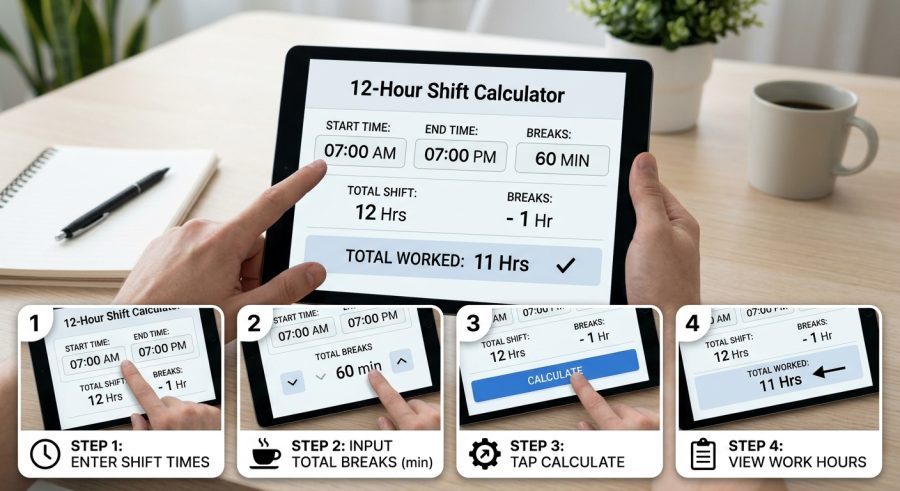
- Enter your start time. Type the hour and minute your shift begins using 24-hour format (for example, 6 for 6:00 AM or 18 for 6:00 PM).
- Set your break duration. Enter the total number of unpaid break minutes you take during the shift (common values are 30 or 60 minutes).
- Enter your hourly pay rate. Type your gross hourly wage in dollars. Leave this at zero if you only need time results.
- Read your results. The calculator instantly shows your shift end time, net hours worked, and estimated gross pay.
Understanding Each Input Field and Unit
Shift Start Hour (0–23): Enter the hour your shift begins in 24-hour (military) format. Midnight is 0, noon is 12, and 6:00 PM is 18. Do not add a colon or AM/PM label — just the number.
Shift Start Minute (0–59): Enter the minute your shift starts. Most shifts begin on the hour, so the default is 0. If your shift starts at 6:30 AM, enter 30 here.
Total Unpaid Break Time (minutes): Enter the combined length of all unpaid breaks during your shift. A single 30-minute lunch break is the most common entry. If you have two 15-minute breaks and one 30-minute lunch, enter 60. Paid rest breaks should not be included because they do not reduce your paid hours.
Hourly Pay Rate ($/hr): Enter your gross hourly wage before taxes. If you only need time results, leave this field at zero. The calculator multiplies your net hours by this rate to estimate gross pay.
Formulas Behind the Shift and Pay Calculations
The calculator uses four straightforward formulas. All time values are converted to minutes first to keep arithmetic simple.
Gross shift length: A 12-hour shift equals 720 minutes. This value is fixed.
Shift end time (hour component):
End Hour = floor((start_hour × 60 + start_minute + 720) / 60) mod 24
This converts the start time to total minutes since midnight, adds 720 minutes, converts back to hours, and wraps around midnight using modulo 24 so overnight shifts display correctly.
Shift end time (minute component):
End Minute = (start_minute + 720) mod 60
Because 720 is evenly divisible by 60, the end minute always equals the start minute for a standard 12-hour shift.
Net hours worked:
Net Hours = (720 − break_minutes) / 60
Unpaid break minutes are subtracted from 720 before dividing by 60. For a 30-minute break: (720 − 30) / 60 = 11.5 hours.
Estimated gross pay:
Gross Pay = Net Hours × hourly_rate
This is a pre-tax estimate. It does not include overtime premiums, holiday pay, or any deductions.
Worked Examples for Common 12-Hour Shift Scenarios
Example 1 — Day shift nurse, 30-minute lunch
Given: Start 07:00, break 30 min, rate $32.00/hr
End time: floor((7×60+0+720)/60) mod 24 = floor(1140/60) mod 24 = 19 → 19:00 (7:00 PM)
Net hours: (720−30)/60 = 690/60 = 11.5 hrs
Gross pay: 11.5 × $32.00 = $368.00
Example 2 — Night shift security guard, no break
Given: Start 20:00, break 0 min, rate $17.50/hr
End time: floor((20×60+0+720)/60) mod 24 = floor(1920/60) mod 24 = 32 mod 24 = 8 → 08:00 next day
Net hours: (720−0)/60 = 12.0 hrs
Gross pay: 12.0 × $17.50 = $210.00
Example 3 — Factory worker, 60-minute total breaks
Given: Start 06:30, break 60 min, rate $22.00/hr
End time: floor((6×60+30+720)/60) mod 24 = floor(1110/60) mod 24 = 18 → 18:30 (6:30 PM)
Net hours: (720−60)/60 = 660/60 = 11.0 hrs
Gross pay: 11.0 × $22.00 = $242.00
Example 4 — Retail supervisor, 45-minute break, rate check
Given: Start 09:00, break 45 min, rate $19.75/hr
End time: floor((9×60+0+720)/60) mod 24 = floor(1260/60) mod 24 = 21 → 21:00 (9:00 PM)
Net hours: (720−45)/60 = 675/60 = 11.25 hrs
Gross pay: 11.25 × $19.75 = $222.19
Example 5 — Overnight hospital tech, 30-minute break
Given: Start 22:00, break 30 min, rate $28.50/hr
End time: floor((22×60+0+720)/60) mod 24 = floor(2040/60) mod 24 = 34 mod 24 = 10 → 10:00 next day
Net hours: (720−30)/60 = 690/60 = 11.5 hrs
Gross pay: 11.5 × $28.50 = $327.75
Common 12-Hour Shift Schedules and Net Hours
| Break Duration (min) | Net Hours Worked | Net Minutes Worked | % of Shift Paid |
|---|---|---|---|
| 0 | 12.00 | 720 | 100% |
| 15 | 11.75 | 705 | 97.9% |
| 30 | 11.50 | 690 | 95.8% |
| 45 | 11.25 | 675 | 93.8% |
| 60 | 11.00 | 660 | 91.7% |
| 90 | 10.50 | 630 | 87.5% |
| 120 | 10.00 | 600 | 83.3% |
How to Read and Apply Your Calculated Results
Shift End Hour and Shift End Minute together form your finish time in 24-hour format. If the end hour is 8 and the end minute is 30, your shift ends at 08:30. For overnight shifts the end hour will be smaller than the start hour — this is correct and means the shift crosses midnight into the next calendar day.
Net Hours Worked is the number of paid hours after unpaid breaks are removed. This is the figure that should appear on your timesheet. A 30-minute break on a 12-hour shift gives 11.5 net hours, not 12.
Estimated Gross Pay is your pre-tax earnings for the shift. It equals net hours multiplied by your hourly rate. This figure does not include overtime premiums (such as time-and-a-half after 8 or 12 hours), shift differentials, bonuses, or any payroll deductions. Compare it to your pay stub as a sanity check, not as a final payroll figure.
All results update instantly when you change any field. If your hourly rate is zero, the gross pay result will also be zero — this is expected behavior, not an error.
Factors That Change Your Net Hours or Take-Home Pay
Break type (paid vs. unpaid): Only unpaid breaks reduce your net hours. Paid rest breaks — often 10 to 15 minutes in many workplaces — should not be entered in the break field. The calculator does not distinguish break types automatically; you must enter only unpaid time.
Overnight crossover: The end-time formula handles midnight crossover correctly using modulo arithmetic. A shift starting at 21:00 ends at 09:00 the next morning. The calculator does not add a “next day” label, so keep that in mind when reading overnight results.
Overtime rules: Many jurisdictions and union contracts trigger overtime pay after 8 hours in a day or 40 hours in a week. This calculator uses a flat hourly rate for all net hours and does not apply overtime multipliers. If you regularly work 12-hour shifts, your actual pay may be higher than the gross pay result.
Shift differentials: Night, weekend, or holiday premiums are not included. Your employer may pay a higher rate for certain hours, which would increase actual earnings beyond the estimate shown.
Rounding: Net hours are shown to two decimal places. Payroll systems may round differently — to the nearest quarter-hour, for example — which can cause small differences between this estimate and your paycheck.
Frequent Errors When Calculating 12-Hour Shifts
- Entering 12-hour clock hours instead of 24-hour format. If your shift starts at 6:00 PM, enter 18, not 6. Entering 6 will calculate a 6:00 AM start and give a wrong end time.
- Including paid rest breaks in the break field. Only enter unpaid break time. Adding paid breaks will undercount your net hours and underestimate your pay.
- Forgetting to enter break minutes at all. Leaving break time at zero when you do take an unpaid lunch will overstate your net hours and gross pay.
- Treating gross pay as take-home pay. The result is pre-tax. Federal and state income tax, Social Security, Medicare, and any benefit deductions will reduce your actual paycheck.
- Assuming the calculator applies overtime rates. If your shift qualifies for overtime, your real pay will be higher than shown. Check your employment contract or local labor law.
- Entering a start minute incorrectly. A shift starting at 6:45 AM needs start hour 6 and start minute 45. Entering only the hour will calculate from 6:00 AM and shift the end time by 45 minutes.
- Expecting the calculator to handle split shifts. This tool calculates one continuous 12-hour block. If you work two separate periods in a day, calculate each separately and add the results.
What This Calculator Does and Does Not Cover
This calculator assumes a fixed gross shift length of exactly 12 hours (720 minutes). It cannot calculate shifts shorter or longer than 12 hours. If you work an 8-hour or 10-hour shift, see the 8-hour shift calculator or the 10-hour shift calculator for those durations.
The gross pay estimate uses a single flat hourly rate for all net hours. Overtime multipliers, shift differentials, holiday pay, bonuses, commissions, and payroll deductions are not modeled. Results are pre-tax estimates only.
The calculator does not account for regional labor laws, union agreements, or employer-specific rounding rules. Break requirements vary by state, province, and country; the tool does not enforce or suggest a legally required break duration.
End times for overnight shifts are displayed as a 24-hour clock value without a “next day” indicator. Users must interpret overnight results accordingly.
For payroll disputes, tax calculations, or compliance questions, consult your employer’s HR department or a qualified payroll professional.
12-Hour Shift Patterns and How They Affect Weekly Hours
Twelve-hour shifts are common in healthcare, manufacturing, emergency services, and logistics. The most popular scheduling patterns are:
- 3-on / 4-off and 4-on / 3-off (rotating): Workers alternate between three and four 12-hour shifts per week, averaging 36–48 hours. Overtime may apply depending on the week.
- Pitman schedule: A four-crew rotation where each crew works two days on, two days off, three days on, then three days off. Workers average 42 hours per week.
- Panama schedule: A 2-2-3 rotation across four crews. Workers average 42 hours per week with every other weekend off.
Understanding your schedule pattern helps you use this calculator correctly. Run it once for each shift day in your rotation to estimate weekly gross pay, then multiply by the number of shifts in your pay period.
Converting 24-Hour Clock Times to AM/PM
This calculator uses 24-hour (military) time for start hours because it avoids AM/PM ambiguity. Here is a quick conversion reference:
- Midnight = 0, 1:00 AM = 1, 6:00 AM = 6, Noon = 12
- 1:00 PM = 13, 2:00 PM = 14, 6:00 PM = 18, 11:00 PM = 23
To convert any PM time, add 12 to the 12-hour clock hour. To convert an AM time, use the hour as-is (except midnight, which is 0). The end-time results are also in 24-hour format, so apply the same conversion in reverse to read them as AM/PM.
Estimating Weekly and Biweekly Pay From Shift Results
Once you have your per-shift gross pay, scaling to a full pay period is straightforward. Multiply the single-shift gross pay by the number of shifts in your pay period.
For example, if you earn $327.75 per 12-hour shift and work three shifts per week, your estimated weekly gross pay is $327.75 × 3 = $983.25. For a biweekly pay period with six shifts, that becomes $327.75 × 6 = $1,966.50.
Remember that overtime rules may increase pay if you exceed 40 hours in a workweek. A worker on a 4-on schedule working four 11.5-hour shifts logs 46 net hours, potentially triggering 6 hours of overtime pay. This calculator does not apply overtime multipliers, so treat weekly estimates as a floor, not a ceiling, if overtime applies to your role.
If you need to find your exact finish time for any shift length, the work end time calculator with break can handle variable shift durations.
12-Hour Shift Calculator: Frequently Asked Questions
Why does the end time show a smaller number than the start time for overnight shifts?
When a 12-hour shift crosses midnight, the end hour wraps around to the next calendar day. For example, a shift starting at 21:00 (9:00 PM) ends at 09:00 the following morning. The calculator uses modulo-24 arithmetic to display the correct clock time. The result is accurate — it simply means your shift ends the next day.
Should I include paid 15-minute rest breaks in the break field?
No. Only enter unpaid break time. Paid rest breaks do not reduce your net hours or pay, so including them would undercount your earnings. Enter only the minutes for which you are not paid — typically an unpaid meal break of 30 to 60 minutes. If all your breaks are paid, enter 0 in the break field.
Does this calculator handle shifts longer or shorter than 12 hours?
No. The gross shift length is fixed at 12 hours (720 minutes). For other shift lengths, use a dedicated calculator. An 8-hour shift calculator or a 10-hour shift calculator will give accurate results for those durations. This tool is specifically designed for the 12-hour shift format.
How accurate is the gross pay estimate?
The estimate is mathematically accurate given the inputs you provide, but it is a pre-tax gross figure only. It does not account for overtime premiums, shift differentials, holiday pay, bonuses, or any payroll deductions such as taxes or benefits. Your actual take-home pay will be lower. Use the result as a planning estimate and verify against your official pay stub.
What if my shift starts at a non-standard minute, like 6:45 AM?
Enter 6 in the start hour field and 45 in the start minute field. The calculator adds both values before computing the end time, so a 6:45 AM start on a 12-hour shift correctly returns an end time of 18:45 (6:45 PM). Always fill in both fields when your shift does not start on the hour.
How do I calculate pay for multiple 12-hour shifts in a week?
Run the calculator once to get your per-shift gross pay, then multiply that figure by the number of shifts you work in the week or pay period. For example, three shifts at $242.00 each equals $726.00 weekly gross. Note that overtime rules may apply if your total weekly hours exceed 40, which this calculator does not model automatically.
Can I use this calculator for metric or non-US currencies?
The time calculations work for any location since hours and minutes are universal. The pay field uses a dollar sign as a label, but the math is currency-neutral — enter your hourly rate in any currency and the result will be in that same currency. The label will still show a dollar sign, so mentally substitute your local currency symbol.
Why does the end minute always equal the start minute?
Because 720 minutes (12 hours) is exactly divisible by 60, adding 720 minutes never changes the minute component of the time. A shift starting at 06:30 always ends at 18:30, and one starting at 07:00 always ends at 19:00. This is a mathematical property of 12-hour shifts, not a calculator limitation.
Plan Every 12-Hour Shift With Confidence
This 12-hour shift calculator gives you an instant, reliable estimate of your finish time, net paid hours, and gross earnings for any 12-hour workday. Enter your start time, unpaid break minutes, and hourly rate, and the results appear immediately. For payroll disputes, overtime questions, or tax planning, always verify with your employer or a qualified payroll professional.
