
Enter your wall width, batten width, and desired spacing to instantly get the exact number of battens needed and the true center-to-center spacing that divides your wall evenly, so every gap looks identical instead of guessing and ending up with an odd leftover space at one end.
Board and Batten Spacing Calculator: Get Even Panel Layouts
Calculate the exact number of battens and true even spacing for a board and batten wall, plus total material length with waste allowance.
What This Batten Layout Tool Solves
This calculator figures out how many vertical battens fit evenly across a wall and what the real spacing between them will be once you round to a whole number of gaps. It is built for anyone planning a board and batten accent wall, wainscoting, or full-height paneling project, including homeowners doing a weekend DIY job and contractors quoting material for a client.
Because wall widths rarely divide evenly by a chosen spacing number, the tool rounds to the closest whole number of gaps and then recalculates the true spacing so every gap matches. Results are planning estimates. Actual layouts should be double-checked on site since wall corners are not always perfectly square and framing behind the wall may shift batten placement slightly.
Steps to Plan Your Wall Layout
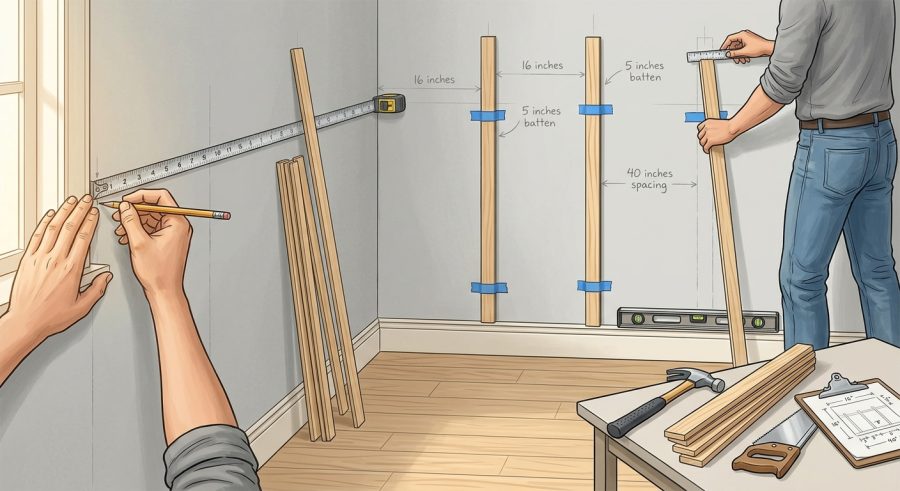
- Measure your wall width and height in inches, corner to corner or between existing trim.
- Measure the width of the batten board you plan to use.
- Decide on a target spacing between battens, such as 12 to 24 inches, based on the look you want.
- Enter any corner or trim width you want excluded from the layout on each side.
- Set a waste allowance percentage to cover cutting mistakes and extra boards.
- Review the number of battens, actual spacing, and total board length before buying materials.
Measurements You Need to Enter
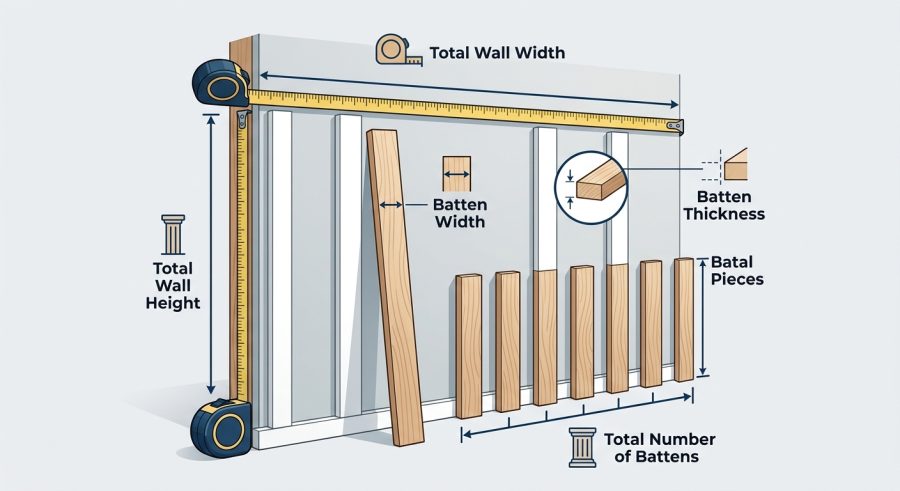
Wall Width: the total horizontal distance to be covered, in inches. Measure between corners or between existing trim boards if you are excluding them separately.
Wall Height: the vertical height of the wall, in inches, used only to calculate total board length needed.
Batten Width: the actual width of the vertical board you plan to install, in inches. Common widths are 2 to 4 inches, but check your actual lumber since nominal and actual sizes differ.
Desired Spacing Between Battens: your target open gap width between two battens, in inches. This is a starting goal; the calculator adjusts it slightly so the wall divides evenly.
Corner or Trim Width to Exclude: if you already have corner boards, door casing, or baseboard trim on each side that should not count as usable wall space, enter that width here. It is subtracted from both sides.
Waste and Extra Allowance: a percentage added to the total board length to cover cutting mistakes, warped boards, and offcuts. Ten percent is a typical starting point for straightforward walls.
How the Even Spacing Is Calculated
All linear measurements are in inches unless converted to feet for the final total. Let W be wall width, H be wall height, B be batten width, S be desired spacing, T be corner trim width on each side, and F be the waste factor as a percent.
Number of Gaps: round((W minus 2 times T minus B) divided by (S plus B)). This estimates how many equal open segments fit once the trimmed edges and one batten width are removed from the usable span.
Number of Battens: the number of gaps plus 1, since each gap is bordered by two battens and adjacent gaps share a batten.
Actual Center-to-Center Spacing: (W minus 2 times T minus total batten width) divided by the number of gaps, where total batten width equals the number of battens times B. This spreads any leftover inches evenly across every gap instead of leaving a mismatched space at one end.
Total Batten Length: number of battens times wall height, multiplied by (1 plus F divided by 100), then divided by 12 to convert inches to feet. This gives the linear footage of board to purchase for full-height vertical battens.
These formulas assume battens run the full wall height with no horizontal trim breaks, and that the wall is a flat rectangle without doors, windows, or outlets interrupting the layout.
Sample Layouts From Small to Large Walls
Example 1: Standard living room wall
- Given: wall width 120 in, height 96 in, batten width 3 in, spacing 16 in, trim 0 in, waste 10 percent
- Formula: gaps = round((120 – 0 – 3) / (16 + 3))
- Substitution: round(117 / 19) = round(6.16)
- Calculation: 6 gaps, 7 battens
- Final result: actual spacing = (120 – 21) / 6 = 16.5 in; total length = (7 x 96 x 1.10) / 12 = 61.6 ft
Example 2: Wall with existing corner trim
- Given: width 180 in, height 108 in, batten width 4 in, spacing 20 in, trim 2 in, waste 15 percent
- Formula: gaps = round((180 – 4 – 4) / (20 + 4))
- Substitution: round(172 / 24) = round(7.17)
- Calculation: 7 gaps, 8 battens
- Final result: actual spacing = (176 – 32) / 7 = 20.571 in; total length = (8 x 108 x 1.15) / 12 = 82.8 ft
Example 3: Narrow bathroom accent wall
- Given: width 96 in, height 84 in, batten width 2 in, spacing 12 in, trim 0 in, waste 5 percent
- Formula: gaps = round((96 – 0 – 2) / (12 + 2))
- Substitution: round(94 / 14) = round(6.71)
- Calculation: 7 gaps, 8 battens
- Final result: actual spacing = (96 – 16) / 7 = 11.429 in; total length = (8 x 84 x 1.05) / 12 = 58.8 ft
Example 4: Small closet or nook wall
- Given: width 48 in, height 96 in, batten width 3 in, spacing 16 in, trim 0 in, waste 10 percent
- Formula: gaps = round((48 – 0 – 3) / (16 + 3))
- Substitution: round(45 / 19) = round(2.37)
- Calculation: 2 gaps, 3 battens
- Final result: actual spacing = (48 – 9) / 2 = 19.5 in; total length = (3 x 96 x 1.10) / 12 = 26.4 ft
Example 5: Large wall with wide trim
- Given: width 240 in, height 120 in, batten width 3.5 in, spacing 24 in, trim 3 in, waste 8 percent
- Formula: gaps = round((240 – 6 – 3.5) / (24 + 3.5))
- Substitution: round(230.5 / 27.5) = round(8.38)
- Calculation: 8 gaps, 9 battens
- Final result: actual spacing = (234 – 31.5) / 8 = 25.313 in; total length = (9 x 120 x 1.08) / 12 = 97.2 ft
Common Spacing Ranges by Style
| Style | Typical Spacing Range | Common Batten Width | Notes |
|---|---|---|---|
| Modern minimalist | 18 to 24 in | 2 to 3 in | Wider gaps, thinner battens for a clean look |
| Traditional farmhouse | 12 to 16 in | 3 to 4 in | Tighter spacing for a classic paneled feel |
| Coastal or cottage | 14 to 18 in | 2.5 to 3.5 in | Balanced spacing works well with beadboard combos |
| Ceiling application | 16 to 24 in | 3 to 4 in | Wider spacing often looks better overhead |
These ranges are general design starting points, not fixed rules. Use the calculator with your own target spacing to see the actual even result for your wall.
Reading Your Batten Count and Spacing Results
Number of Gaps is the whole number of equal open spaces the wall divides into after rounding. This is the core number that drives every other result.
Number of Battens Needed adds one extra board because a run of gaps always has one more batten than gap, including the two end pieces.
Actual Center-to-Center Spacing is the true distance to mark between battens. It usually differs slightly from your entered target spacing because the wall width rarely divides evenly; use this adjusted number when marking your layout.
Total Batten Length is rounded to one decimal place and given in feet, already including your chosen waste percentage. Round up to the next full board length when buying lumber, since boards come in fixed standard lengths.
What Changes Your Batten Count
Batten width: wider battens leave less open wall space and reduce how many fit, which the calculator accounts for directly in every formula.
Corner or trim width: existing trim shrinks the usable width on each side. The calculator subtracts this before dividing the wall into segments.
Rounding direction: the tool always rounds to the nearest whole gap count, which can shift the actual spacing up or down from your original target by a small amount.
Waste allowance: higher waste percentages increase the total footage ordered but do not change the batten count or spacing layout.
Obstructions: windows, doors, and outlets are not factored in. Walls with these features need manual adjustment around the calculated layout.
Layout Errors That Ruin Symmetry
- Using nominal lumber size instead of actual width: a board sold as 1×3 is usually 2.5 inches wide, not 3. Measure the real width before entering it.
- Forgetting to subtract corner trim: skipping this input can throw off spacing near the corners where trim already exists.
- Assuming the entered spacing is final: the calculator adjusts your target to the nearest even value, so always use the actual spacing result, not your original guess.
- Ignoring wall obstructions: outlets, switches, and windows are not part of this calculation and may require shifting battens manually.
- Underestimating waste: low-quality lumber or many angled cuts can use more material than a small waste percentage covers.
- Mixing units: entering feet in an inch field, or vice versa, will produce an incorrect layout.
- Not double-checking on site: walls are rarely perfectly square, so verify measurements at both the top and bottom of the wall before cutting.
What This Tool Does Not Account For
This calculator assumes a flat, rectangular wall with battens running the full height and no interruptions from doors, windows, outlets, or uneven framing. It does not calculate horizontal top or bottom trim boards, adhesive or fastener quantities, or paint coverage. Regional lumber sizing and pricing vary, and actual board lengths available for purchase may not match the calculated footage exactly, so rounding up to standard lengths is often necessary. This tool provides planning estimates only. For structural attachment, load-bearing walls, or any project involving building code compliance, consult a qualified contractor or local building department before installation.
Adjusting Layout Around Windows and Doors
When a wall includes a window, door, or other obstruction, run the calculator separately for each continuous wall segment on either side of the opening. Treat each segment as its own mini wall width, then decide whether to align battens on both sides for visual symmetry or let each segment divide independently. Many installers prioritize centering a batten or a gap directly above door and window trim for a cleaner look.
Choosing Between Wider Gaps and Narrower Battens
The relationship between batten width and spacing affects both material cost and visual rhythm. Narrower battens with wider spacing create a more open, modern look and use less lumber. Wider battens with tighter spacing produce a denser, more traditional paneled appearance but require more material. Adjust the batten width and desired spacing inputs together to compare total length and gap count before settling on a final design.
Applying This to Ceilings and Wainscot Panels
The same even-spacing math applies to ceiling beams or wainscot-height paneling. For ceilings, enter the ceiling length as the wall width and the batten run length as the wall height. For wainscot projects that only cover the lower portion of a wall, enter the wainscot height instead of full wall height so the total length result matches the actual material needed.
Board and Batten Spacing Questions
How does the calculator decide the number of battens?
It divides the usable wall width, after subtracting corner trim and one batten width, by the sum of your desired spacing and batten width, then rounds to the nearest whole number of gaps. One batten is added for every gap, so the batten count equals the gap count plus one.
Why is my actual spacing different from what I entered?
Wall widths rarely divide evenly by a chosen spacing value. The calculator rounds to the closest whole number of gaps, then recalculates the exact spacing so every gap is identical, which usually shifts the number slightly from your original entry.
What unit should I use for all measurements?
Enter all length fields in inches, including wall width, wall height, batten width, spacing, and trim width. The total batten length result is automatically converted to feet for easier lumber purchasing.
Does this tool account for windows, doors, or outlets?
No. The calculator assumes a flat, unobstructed rectangular wall. For walls with openings, calculate each continuous section separately and adjust batten placement manually around the obstruction.
How much waste allowance should I choose?
Ten percent is a reasonable starting point for straightforward walls with simple cuts. Increase it toward 15 to 20 percent for complex layouts, angled walls, or lower quality lumber that is more likely to warp or split.
Can I use this for horizontal batten layouts?
The formulas work the same way regardless of orientation. For a horizontal layout, treat the wall height as the width to divide and the wall width as the run length used for total board length.
Is the total batten length exact enough to order lumber?
It is a close planning estimate, not an exact cut list. Round the result up to match standard board lengths sold at lumber yards, and always verify wall measurements on site before finalizing your order.
What if the corner trim width is larger on one side than the other?
This calculator assumes equal trim width on both sides. For walls with uneven trim, subtract each trim width manually from the wall width before entering it, then treat the remaining usable width as your wall width input.
Getting Ready to Cut and Install
Getting even batten spacing comes down to accurate measurements and letting the math adjust your target spacing to fit the wall exactly. Once you have the batten count, actual spacing, and total length, measure twice on the actual wall, account for any windows or doors separately, and round up your lumber order to standard board lengths before cutting.
