
This calculator estimates how many support posts your deck beam needs and the actual spacing between them. Enter your beam run length, maximum allowable post spacing, load category, and overhang, and it divides the effective beam length into equal spans. The result shows the number of spans, posts per beam row, real on-center spacing, and total posts for decks with multiple beam rows, as a planning estimate before code review.
Deck Post Spacing Calculator: Posts, Spans & Layout
Calculate deck beam post spans, on-center spacing, and total posts needed based on beam run length, allowable spacing, load category, and overhang.
Planning Your Deck Beam Support Layout
This calculator helps homeowners, DIY builders, and contractors work out how many posts a deck beam run needs and where those posts should land. It takes a beam run length, an allowable spacing limit, a load category, and an overhang distance, then works out the number of equal spans and posts required.
It is meant for early planning, before you order lumber or dig footings. The output is an estimate based on the spacing limit and load factor you provide, not an engineered calculation. Actual post placement must still be checked against your local building code and, for larger or unusual decks, reviewed by a qualified engineer or building inspector.
Steps to Calculate Post Count and Spacing
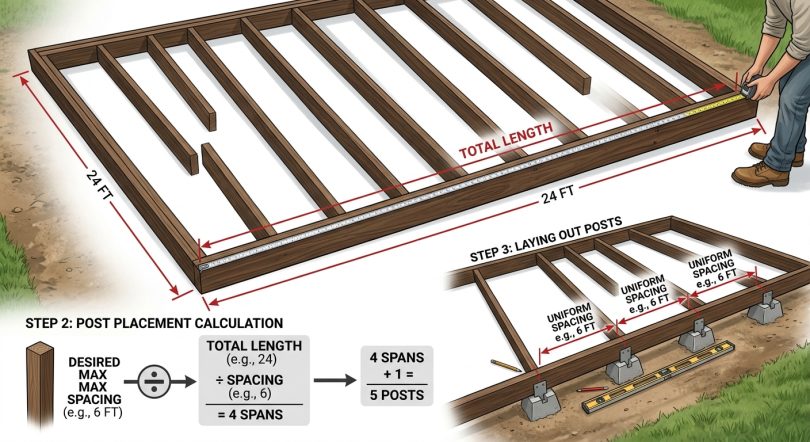
- Measure your beam run length in feet, from one end of the beam to the other, including any planned overhang.
- Find the maximum allowable post spacing for your beam size and species from a local beam span table or building code chart.
- Choose the load category that best matches your climate and expected deck use.
- Enter the overhang distance the beam extends past the end posts on each side.
- Enter the number of parallel beam rows if your deck design uses more than one.
- Review the calculated post spans, spacing, and total posts, then confirm the results against local code before building.
What Each Beam and Load Input Means
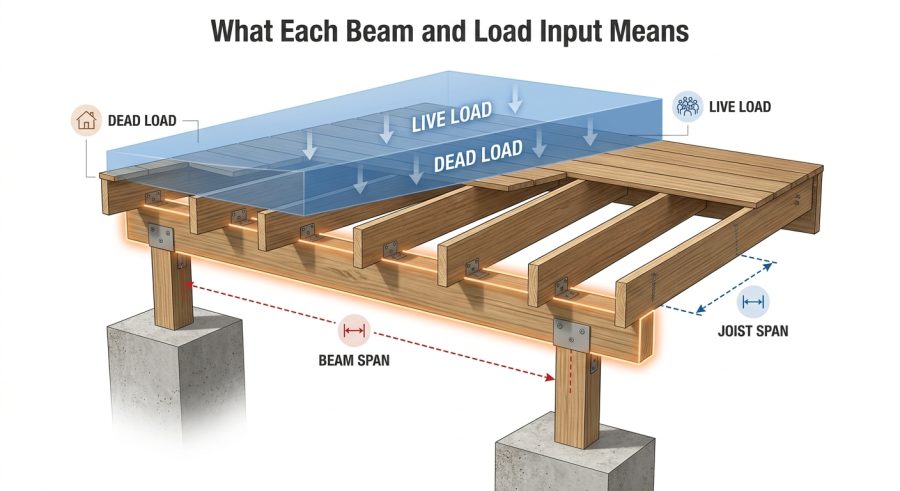
Beam Run Length (ft): the total length of the beam line, measured end to end, including any overhang past the posts.
Maximum Allowable Post Spacing (ft): the largest gap allowed between posts for your specific beam size, species, and grade. This value should come from a local beam span table or your building department, not a guess.
Load Category: a general adjustment for the load your deck will carry. Light Residential uses the full spacing value, Standard Residential reduces it slightly, and Heavy Snow or High Live Load reduces it more to reflect the extra structural demand common in snow-load regions or decks with heavier expected use.
Beam Overhang (ft): the distance the beam extends past the outermost posts on each end. This is entered once and applied to both ends equally.
Number of Beam Rows: how many parallel beam lines your deck design includes. Multi-level or multi-span decks often have two or more beam rows running the same calculation independently.
How Post Spans and Spacing Are Calculated
All lengths are in feet. The calculator applies these steps in order:
Adjusted Max Post Spacing = max_post_spacing_base multiplied by load_category. This lowers your spacing limit for higher load conditions.
Effective Beam Run Length = deck_run_length minus (2 multiplied by beam_overhang). This removes the overhang sections from both ends, since posts only need to support the span between them.
Number of Post Spans = the effective beam run length divided by the adjusted max post spacing, rounded up to the next whole number using a ceiling function. Rounding up guarantees no single span exceeds your allowable spacing.
Posts per Beam Row = number of post spans plus 1, since a line divided into equal spans always needs one more post than the number of gaps.
Actual Post Spacing = effective beam run length divided by the number of post spans. This is the real, even spacing you would mark out on site, and it will always be equal to or smaller than your adjusted maximum.
Total Posts Needed = posts per beam row multiplied by number_of_beam_rows, giving the full post count across the entire deck substructure.
This method assumes a straight beam run with evenly spaced posts. It does not account for cantilevers beyond simple end overhangs, angled or curved layouts, or point loads from features like stairs or hot tubs.
Sample Beam Runs and Their Post Layouts
Example 1: Small deck, light load. Given: run length 24 ft, max spacing 8 ft, Light Residential (1.0), overhang 1 ft, 1 beam row.
Formula: spans = ceil((24 – 2*1) / (8*1)). Substitution: ceil(22 / 8) = ceil(2.75). Calculation: 3 spans. Final result: 4 posts per row, actual spacing 22/3 = 7.33 ft, total posts 4.
Example 2: Larger deck, two beam rows, standard load. Given: run length 32 ft, max spacing 6 ft, Standard Residential (0.9), overhang 1.5 ft, 2 beam rows.
Formula: adjusted spacing = 6*0.9 = 5.4 ft. Effective run = 32 – 3 = 29 ft. Spans = ceil(29/5.4) = ceil(5.37). Calculation: 6 spans. Final result: 7 posts per row, actual spacing 29/6 = 4.83 ft, total posts 7*2 = 14.
Example 3: Compact deck, heavy snow load. Given: run length 16 ft, max spacing 8 ft, Heavy Snow (0.75), overhang 0.5 ft, 1 beam row.
Formula: adjusted spacing = 8*0.75 = 6 ft. Effective run = 16 – 1 = 15 ft. Spans = ceil(15/6) = ceil(2.5). Calculation: 3 spans. Final result: 4 posts, actual spacing 15/3 = 5.00 ft.
Example 4: Large multi-beam deck. Given: run length 48 ft, max spacing 10 ft, Light Residential (1.0), overhang 2 ft, 3 beam rows.
Formula: effective run = 48 – 4 = 44 ft. Spans = ceil(44/10) = ceil(4.4). Calculation: 5 spans. Final result: 6 posts per row, actual spacing 44/5 = 8.80 ft, total posts 6*3 = 18.
Typical Spacing Ranges by Beam Size
| Beam Size (built-up, nominal) | Typical Max Spacing Range | Notes |
|---|---|---|
| Double 2×8 | Approximately 5 to 7 ft | Varies by species, grade, and load; check local span table |
| Double 2×10 | Approximately 6 to 9 ft | Common for mid-size residential decks |
| Double 2×12 | Approximately 7 to 11 ft | Larger spans still require code verification |
| Triple 2×10 or 2×12 | Approximately 8 to 12 ft | Used for longer runs or heavier loads |
These ranges are general illustrations only. Always confirm the actual maximum allowable spacing using a beam span table matched to your beam size, wood species, grade, and local load requirements.
Reading Your Post Count and Spacing Results
The Adjusted Max Post Spacing shows your allowable spacing limit after the load category reduction, expressed in feet. The Effective Beam Run Length is the portion of the beam that actually needs support, after removing overhangs.
Number of Post Spans and Posts per Beam Row tell you how many equal sections and posts are needed for one beam line. Actual Post Spacing is the real, evenly divided distance you would mark and dig footings at, always at or under your adjusted maximum. Total Posts Needed multiplies posts per row by the number of beam rows for a full project count.
Results round the post counts up to whole numbers, since a partial post is not possible, while spacing figures show two decimal places for layout accuracy. Because these are planning figures, always double-check against your local code before finalizing footing locations.
What Changes Your Post Spacing Numbers
Beam run length: directly drives how many spans and posts are needed; the calculator accounts for this fully.
Maximum allowable spacing: this must reflect your actual beam size, species, and grade. The calculator only applies the number you provide and does not verify it against code tables.
Load category: the calculator applies a simplified multiplier to represent higher snow or live loads. It does not replace an actual load calculation for your region.
Overhang: reduces the effective span length on both ends equally; uneven overhangs are not supported.
Number of beam rows: multiplies total post count but assumes each row uses the same spacing inputs; decks with different beam sizes per row need separate calculations.
Soil conditions and footing design are not factored in here and must be addressed separately per local code.
Layout Errors That Lead to Bad Spacing
- Using a generic spacing number instead of a table value: always pull the maximum spacing from a beam span table matched to your actual beam size and species.
- Forgetting to include overhang in the run length: measure the full beam length first, then let the calculator subtract the overhang.
- Picking the wrong load category: a deck in a heavy snow region needs the reduced spacing category, not the light residential default.
- Assuming equal spacing without rounding up spans: spacing must always round up to a whole number of spans so no gap exceeds the limit.
- Applying one beam row’s result to a different beam size: recalculate separately if beam sizes differ between rows.
- Skipping code confirmation: this tool gives a planning estimate, not a final, code-approved layout.
- Ignoring point loads: features like stairs, hot tubs, or built-in benches can require additional posts not reflected here.
Where This Estimate Stops and Code Review Begins
This calculator provides a prescriptive-style planning estimate based on the spacing limit, load category, and overhang you enter. It assumes a straight, rectangular beam run with evenly spaced posts and does not model curved layouts, cantilevers beyond a simple overhang, or concentrated point loads.
Load category factors used here are general planning multipliers, not official code-specified reduction values, and building codes vary by state, county, and local jurisdiction. Footing size, soil bearing capacity, and post-to-beam connection details are not included and must be determined separately.
For any deck beyond a small, low-height, low-load structure, or in areas with significant snow, wind, or seismic requirements, consult your local building department or a licensed engineer before finalizing post spacing and footing design. This tool does not replace professional structural review.
Single-Beam vs Multi-Beam Deck Layouts
A single-beam deck has one beam row supporting the joists, so the post count from this calculator applies directly. Larger or multi-level decks often use two or more parallel beam rows, each potentially with a different span length or beam size.
When you enter more than one beam row, the calculator assumes every row uses the same run length, spacing limit, and load category. If your rows differ in beam size or length, run the calculator separately for each row and add the post totals together for an accurate project count.
Adjusting for Footing and Post Placement
Once you know the number of posts and their spacing, the next step is footing layout. Footings are typically centered under each calculated post location, sized according to local frost depth and soil bearing requirements.
This calculator does not size footings or determine frost depth, since those depend heavily on regional code and soil conditions. Use the post spacing output as a starting layout, then confirm footing size and depth with your local building department.
Attached vs Freestanding Deck Considerations
An attached deck ties into the house with a ledger board, so the beam row calculated here usually sits at the outer edge, opposite the house. A freestanding deck has beams and posts on both sides, meaning you may need to run this calculator twice, once for each beam row.
Load distribution can differ between attached and freestanding designs, so the load category and spacing limit you choose should reflect the specific beam size and span table for each situation.
Deck Post Spacing Questions Answered
How is maximum post spacing determined for a given beam size?
Maximum post spacing comes from a beam span table matched to your beam’s size, wood species, and grade, along with your local snow and live load requirements. This calculator does not generate that number for you; you enter it based on your specific beam table or local code.
Why does load category change the allowable spacing?
Higher loads, like heavy snow, require beams to carry more weight over the same span, which typically means posts must be placed closer together. The load category applies a simplified reduction to represent that relationship for planning purposes.
How much overhang is typically allowed beyond the last post?
Allowed overhang varies by beam size and local code, often limited to a fraction of the adjacent span length. Enter your planned overhang distance, and confirm it does not exceed the limit specified in your beam span table or building code.
Do multiple beam rows need the same spacing calculation?
Only if all rows share the same beam size, run length, and load conditions. If beam rows differ, calculate each row separately and add the resulting post counts together for an accurate total.
How does this estimate differ from an engineered deck plan?
This calculator applies simplified prescriptive-style math using values you provide. An engineered plan considers actual loads, soil conditions, connection details, and site-specific factors, and is stamped by a licensed professional for code compliance.
What happens if the calculated spacing exceeds local code limits?
If your actual post spacing input or resulting spacing exceeds what your local code or beam table allows, you need to reduce the maximum allowable spacing value, add posts, or choose a larger beam size and recalculate.
Can this calculator be used for both attached and freestanding decks?
Yes, it can be used for either type. Freestanding decks typically need the calculation run separately for each beam row, since both sides carry structural load, while attached decks usually need it for the single outer beam row.
Does this calculator size footings or determine frost depth?
No, this tool only calculates post spans, spacing, and post counts along a beam run. Footing size, depth, and soil bearing capacity depend on local code and must be determined separately.
Turning These Numbers Into a Buildable Plan
Use this calculator as a starting point for laying out deck beam posts, not as a final structural plan. It quickly turns your beam run length, spacing limit, load category, and overhang into a workable post count and spacing pattern. Before digging footings, confirm your spacing limit and load assumptions against your local building code or with a qualified professional to make sure the final layout meets safety requirements.

One Response