
To find your hours worked, subtract your total break time from the span between your start and end times. For example, clocking in at 9:00 AM and out at 5:30 PM with a 30-minute lunch yields exactly 8 hours of paid work. Enter your shift start time, end time, break durations, days worked, and hourly rate below, and the calculator instantly returns net hours, overtime hours, and estimated gross daily pay.
Hours Worked Calculator With Lunch Break & Pay
Calculate net hours worked after deducting lunch and other unpaid breaks, then estimate daily gross pay and overtime for any shift.
What This Calculator Computes and Who It Helps
This calculator finds the net hours you actually worked in a day after removing unpaid lunch and other break time, then scales that figure to a weekly total and estimates your gross daily pay — including any overtime premium. It is designed for employees, freelancers, HR administrators, payroll managers, and small business owners who need a fast, reliable way to verify timesheets or project earnings before a paycheck arrives.
Use it any time you clock in and out of a single same-day shift and want to know exactly how many paid hours to report. Results are calculated estimates based solely on the values you enter. They are not a substitute for your employer’s official timekeeping system or a payroll professional’s review.
How to Enter Your Shift Details Accurately
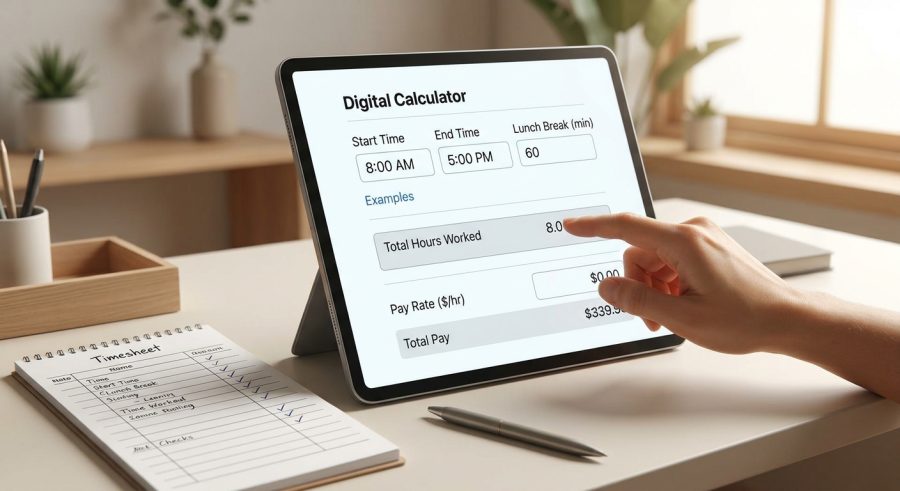
- Enter your shift start time using 24-hour format — for example, 9 for 9:00 AM or 13 for 1:00 PM — and add the exact start minutes if your shift does not begin on the hour.
- Enter your shift end time the same way. The end time must be later than the start time on the same calendar day; overnight shifts are not supported by this calculator.
- Select your lunch break duration from the dropdown. Choose only unpaid break time — if your employer pays you during lunch, select “No lunch break.”
- Add any other unpaid breaks in minutes, such as an unpaid rest period or personal time. Leave this at 0 if all other breaks are paid.
- Choose the number of days worked this week and enter your hourly pay rate to see weekly hours and daily gross pay estimates.
- Adjust the overtime threshold and multiplier to match your employer’s policy or local labor rules, then read your results in the cards below.
Understanding Every Field and Its Units
Shift Start (hour, 0–23) and Shift Start (minutes): Enter your clock-in time in 24-hour format. Midnight is 0, noon is 12, and 5:00 PM is 17. The minutes field captures anything after the hour — enter 30 for a 9:30 AM start, for example.
Shift End (hour, 0–23) and Shift End (minutes): Enter your clock-out time the same way. The end time must be later than the start time on the same calendar day. If your shift crosses midnight, use the overnight shift calculator instead.
Lunch Break Duration: Select the length of your unpaid meal break. Only choose a value here if that break time is truly unpaid. A paid lunch should not be deducted — leave this at “No lunch break” in that case.
Other Unpaid Breaks (minutes): Enter any additional unpaid time, such as an unpaid rest period or personal errand. Paid rest breaks — the short 10- or 15-minute breaks many employers provide — should not be entered here.
Days Worked This Week: Select how many days you worked identical shifts this week. The calculator multiplies your daily net hours by this number to produce a weekly total. If your daily hours vary, run the calculator separately for each day and add the results.
Hourly Pay Rate: Enter your base straight-time rate in dollars per hour (or your local currency equivalent). Do not include shift differentials or bonuses, as those are not modeled.
Daily Overtime Threshold: Select the number of daily hours after which overtime pay begins. The US federal standard is 8 hours per day in most contexts, but some states and employers use different thresholds. A 4-day, 10-hour workweek commonly uses a 10-hour threshold.
Overtime Pay Multiplier: Select the rate at which overtime hours are paid. Time-and-a-half (1.5x) is the most common US standard, but double time (2.0x) applies in some states or after a certain number of consecutive hours.
The Math Behind Net Hours, Overtime, and Gross Pay
All time values are first converted to total minutes to avoid fractional-hour errors, then converted back to decimal hours at the end.
Gross elapsed time (minutes):
Elapsed = (Shift End Hour × 60 + Shift End Minutes) − (Shift Start Hour × 60 + Shift Start Minutes)
Net hours worked (decimal):
Net Hours = (Elapsed − Lunch Minutes − Other Break Minutes) ÷ 60
Regular hours (daily):
Regular Hours = min(max(Net Hours, 0), Overtime Threshold)
This caps regular hours at the overtime threshold and floors them at zero so a negative result never appears.
Overtime hours (daily):
Overtime Hours = max(Net Hours − Overtime Threshold, 0)
Any net hours beyond the threshold are overtime; the max() function prevents a negative value when no overtime is worked.
Weekly hours:
Weekly Hours = Net Hours × Days Worked This Week
This assumes every day has the same shift pattern. If days differ, calculate each day separately.
Regular pay (daily):
Regular Pay = Regular Hours × Hourly Rate
Total daily gross pay:
Gross Pay = Regular Pay + (Overtime Hours × Hourly Rate × Overtime Multiplier)
This is a pre-tax, pre-deduction estimate. Taxes, Social Security, Medicare, and other withholdings are not included.
Five Realistic Shift Scenarios With Full Calculations
Example 1 — Standard 8-hour office shift
Given: Start 9:00, End 17:30, Lunch 30 min, Other breaks 0 min, Rate $18/hr, Threshold 8 hr, Multiplier 1.5x, Days 5
Elapsed = (17×60+30) − (9×60+0) = 1050 − 540 = 510 min
Net Hours = (510 − 30 − 0) ÷ 60 = 480 ÷ 60 = 8.00 hrs
Regular Hours = min(8.00, 8) = 8.00 hrs; Overtime = max(8.00 − 8, 0) = 0.00 hrs
Regular Pay = 8.00 × $18 = $144.00; Gross Pay = $144.00
Weekly Hours = 8.00 × 5 = 40.00 hrs
Example 2 — Long shift with overtime
Given: Start 7:00, End 18:00, Lunch 30 min, Other breaks 15 min, Rate $22/hr, Threshold 8 hr, Multiplier 1.5x, Days 5
Elapsed = (18×60+0) − (7×60+0) = 1080 − 420 = 660 min
Net Hours = (660 − 30 − 15) ÷ 60 = 615 ÷ 60 = 10.25 hrs
Regular Hours = min(10.25, 8) = 8.00 hrs; Overtime = max(10.25 − 8, 0) = 2.25 hrs
Regular Pay = 8.00 × $22 = $176.00; OT Pay = 2.25 × $22 × 1.5 = $74.25
Gross Pay = $176.00 + $74.25 = $250.25
Example 3 — 4-day, 10-hour workweek (no overtime)
Given: Start 6:00, End 16:30, Lunch 30 min, Other breaks 0 min, Rate $25/hr, Threshold 10 hr, Multiplier 1.5x, Days 4
Elapsed = (16×60+30) − (6×60+0) = 990 − 360 = 630 min
Net Hours = (630 − 30 − 0) ÷ 60 = 600 ÷ 60 = 10.00 hrs
Regular Hours = min(10.00, 10) = 10.00 hrs; Overtime = 0.00 hrs
Regular Pay = 10.00 × $25 = $250.00; Gross Pay = $250.00
Weekly Hours = 10.00 × 4 = 40.00 hrs
Example 4 — Part-time shift, no lunch break
Given: Start 13:00, End 17:00, Lunch 0 min, Other breaks 0 min, Rate $15/hr, Threshold 8 hr, Multiplier 1.5x, Days 3
Elapsed = (17×60+0) − (13×60+0) = 1020 − 780 = 240 min
Net Hours = (240 − 0 − 0) ÷ 60 = 4.00 hrs
Regular Hours = min(4.00, 8) = 4.00 hrs; Overtime = 0.00 hrs
Regular Pay = 4.00 × $15 = $60.00; Gross Pay = $60.00
Weekly Hours = 4.00 × 3 = 12.00 hrs
Example 5 — Double-time overtime policy
Given: Start 8:00, End 20:30, Lunch 60 min, Other breaks 15 min, Rate $30/hr, Threshold 8 hr, Multiplier 2.0x, Days 1
Elapsed = (20×60+30) − (8×60+0) = 1230 − 480 = 750 min
Net Hours = (750 − 60 − 15) ÷ 60 = 675 ÷ 60 = 11.25 hrs
Regular Hours = min(11.25, 8) = 8.00 hrs; Overtime = max(11.25 − 8, 0) = 3.25 hrs
Regular Pay = 8.00 × $30 = $240.00; OT Pay = 3.25 × $30 × 2.0 = $195.00
Gross Pay = $240.00 + $195.00 = $435.00
Common Shift Patterns: Net Hours at a Glance
| Start Time | End Time | Lunch Break | Other Breaks | Net Hours | OT Hours (8-hr threshold) |
|---|---|---|---|---|---|
| 8:00 AM | 4:00 PM | 30 min | 0 min | 7.50 hrs | 0.00 hrs |
| 9:00 AM | 5:30 PM | 30 min | 0 min | 8.00 hrs | 0.00 hrs |
| 7:00 AM | 5:00 PM | 30 min | 0 min | 9.50 hrs | 1.50 hrs |
| 6:00 AM | 6:00 PM | 60 min | 15 min | 10.75 hrs | 2.75 hrs |
| 8:00 AM | 12:00 PM | 0 min | 0 min | 4.00 hrs | 0.00 hrs |
| 7:30 AM | 6:00 PM | 45 min | 0 min | 9.75 hrs | 1.75 hrs |
Reading and Applying Your Six Result Cards
Net Hours Worked (Daily) is your primary output — the total paid hours for the shift after all unpaid breaks are removed. This is the number you would enter on a timesheet.
Regular Hours (Daily) shows how many of those net hours fall at your standard pay rate. It will never exceed your chosen overtime threshold.
Overtime Hours (Daily) shows any hours beyond the threshold. If this reads 0.00, you did not trigger daily overtime with the current inputs.
Total Hours Worked (Weekly) multiplies your daily net hours by the number of days you selected. Because it assumes every day is identical, use it as a planning estimate when your schedule is consistent. For variable schedules, add each day’s net hours manually.
Regular Pay (Daily) is your regular hours multiplied by your hourly rate. It does not include overtime.
Total Daily Gross Pay combines regular pay and overtime pay into a single pre-tax daily earnings figure. This is an estimate — actual take-home pay will be lower after taxes and other deductions are applied. Always confirm final pay with your employer’s payroll system or a payroll professional.
What Affects Your Net Hours and Pay the Most
Break classification (paid vs. unpaid): This is the single most common source of error. Only unpaid breaks reduce your net hours. Paid rest breaks — typically 10 to 15 minutes — should not be entered in either break field. The calculator has no way to verify whether a break is paid or unpaid; you must classify it correctly.
Overtime threshold selection: The threshold you choose directly determines how many hours are paid at the premium rate. Federal US law generally requires overtime after 40 hours per week, but some states (California, for example) also require daily overtime after 8 hours. This calculator applies only the daily threshold you select, not a weekly 40-hour federal calculation.
Overtime multiplier: Choosing 1.0x instead of 1.5x will significantly understate overtime pay. Confirm your employer’s policy and any applicable state law before selecting a multiplier.
Consistent daily schedule assumption: The weekly hours result assumes every workday has the same start time, end time, and breaks. If any day differs, the weekly figure will be inaccurate. Run the calculator once per unique shift pattern and sum the results.
Hourly rate accuracy: The calculator uses a single base rate. Shift differentials, tips, commissions, or bonuses are not included. If your effective rate varies, the gross pay estimate will differ from your actual paycheck.
Eight Errors That Skew Your Hours or Pay Estimate
- Including paid breaks as unpaid deductions: If your employer pays you during a 15-minute rest break, do not enter it in the break fields. Doing so understates your net hours and pay.
- Using 12-hour clock format instead of 24-hour: Entering 5 for 5:00 PM instead of 17 will produce a large negative elapsed time. Always convert PM hours by adding 12 (except 12:00 PM, which stays 12).
- Leaving the end time earlier than the start time: The calculator does not handle overnight shifts. If your end hour is numerically less than your start hour, the net hours result will be negative and meaningless.
- Selecting the wrong overtime threshold: Using the 8-hour standard when your employer uses a 10-hour threshold for a compressed workweek will incorrectly show overtime hours that are not actually owed.
- Treating gross pay as take-home pay: The gross pay result is before taxes, Social Security, Medicare, health insurance, and any other deductions. Net take-home pay will be lower.
- Assuming weekly hours are exact when days vary: The weekly total is your daily net hours times the number of days. If Monday is 8 hours and Tuesday is 6 hours, you cannot use a single run of the calculator for both.
- Forgetting to update the overtime multiplier: The default is 1.5x. If your employer pays double time after a certain point, or straight time for voluntary overtime, update this field before reading the pay results.
- Entering decimal hours in the hour fields: The hour fields accept whole numbers only (0–23). If your shift starts at 8:45, enter 8 in the hour field and 45 in the minutes field — not 8.75.
What This Calculator Cannot Do
Same-day shifts only: This calculator requires the end time to be later than the start time on the same calendar day. It cannot handle shifts that cross midnight. For those, use a dedicated overnight shift calculator.
Daily overtime only: The overtime calculation uses the daily threshold you select. It does not apply the US federal weekly 40-hour overtime rule or any state-specific weekly overtime rules. If your jurisdiction calculates overtime on a weekly basis, this tool will not capture that correctly.
Identical daily schedule assumed for weekly totals: The weekly hours result is a simple multiplication. Variable schedules require separate calculations per day.
Pre-tax gross pay only: No tax, Social Security, Medicare, retirement contribution, or benefit deduction is modeled. The pay figures are planning estimates, not payroll outputs.
Single pay rate: Shift differentials, piece rates, tips, commissions, and bonuses are not supported. The calculator assumes one flat hourly rate for the entire shift.
No legal advice: Break requirements, overtime rules, and minimum wage laws vary by country, state, and industry. This tool does not interpret or apply labor law. Consult your employer’s HR department or a qualified employment attorney for guidance on your specific situation.
Paid vs. Unpaid Breaks: Why the Distinction Matters
Under US federal law (the Fair Labor Standards Act), rest breaks of 20 minutes or fewer are generally considered paid work time and must be counted toward hours worked. Meal breaks of 30 minutes or more are typically unpaid — but only if the employee is completely relieved of duties during that time.
This distinction has a direct impact on your net hours calculation. If you enter a paid 15-minute rest break as an unpaid deduction, you will undercount your hours and understate your pay. Only enter break time in the lunch or other-breaks fields if that time is genuinely unpaid and duty-free. When in doubt, check your employment agreement or ask your HR department.
Converting Hours and Minutes to Decimal Hours
Payroll systems and many timesheets express time as decimal hours rather than hours and minutes. The conversion is straightforward: divide the minutes by 60 and add the result to the whole hours.
For example, 7 hours and 45 minutes = 7 + (45 ÷ 60) = 7 + 0.75 = 7.75 decimal hours. Similarly, 8 hours and 20 minutes = 8 + (20 ÷ 60) ≈ 8.33 decimal hours.
This calculator performs that conversion automatically. The net hours results are already expressed as decimal hours, so you can copy them directly into a timesheet or payroll system without any additional math.
Planning a Compressed or 4-Day Workweek Schedule
A 4-day, 10-hour workweek is increasingly common. To model it accurately, set the Daily Overtime Threshold to 10 hours and Days Worked This Week to 4. As long as each shift stays at or under 10 net hours, no daily overtime is triggered, and the weekly total will be 40 hours — the same as a standard 5-day week.
If you work a compressed schedule and want to find the exact end time for a given start time and break, the work end time calculator with break can solve for your finish time directly. For a fixed 10-hour shift pattern, the 10-hour shift calculator offers additional planning details specific to that schedule length.
Hours Worked With Lunch: Frequently Asked Questions
Does a lunch break count as hours worked?
Generally, no. An unpaid meal break of 30 minutes or more during which you are fully relieved of work duties does not count as hours worked under US federal law. However, a paid rest break of 20 minutes or fewer typically does count. Always check your employment agreement and applicable state law, as rules vary.
How do I calculate hours worked with a 30-minute lunch break?
Subtract your clock-in time from your clock-out time to get the total elapsed time, then subtract 30 minutes. For example, 8:00 AM to 4:30 PM is 510 minutes elapsed. Subtract 30 minutes for lunch to get 480 minutes, which equals exactly 8.00 decimal hours. This calculator performs that subtraction automatically once you enter your times.
What is the legal requirement for lunch breaks in the US?
Federal law does not require employers to provide meal breaks, but most states do. Where required, meal breaks are typically 30 minutes and unpaid. Requirements vary significantly by state, industry, and employee age. This calculator does not enforce or interpret any legal break requirement — consult your state labor agency or an employment attorney for guidance specific to your situation.
How does daily overtime differ from weekly overtime?
Weekly overtime (the US federal standard) triggers premium pay after 40 hours in a workweek. Daily overtime triggers premium pay after a set number of hours in a single day — commonly 8 hours in states like California. This calculator applies only the daily threshold you select. If your jurisdiction uses weekly overtime, the overtime results here may not reflect what you are legally owed.
Can I use this calculator for overnight shifts?
No. This calculator requires the shift end time to be later than the start time on the same calendar day. If your shift crosses midnight — for example, 10:00 PM to 6:00 AM — the end hour (6) is numerically less than the start hour (22), which produces an incorrect negative result. Use a dedicated overnight shift tool for those schedules.
What is time-and-a-half, and when does it apply?
Time-and-a-half means overtime hours are paid at 1.5 times your regular hourly rate. For example, at $20/hr, overtime hours pay $30/hr. Under the US Fair Labor Standards Act, non-exempt employees must receive time-and-a-half for hours over 40 in a workweek. Some states and employers also require it for daily overtime. Select 1.5x in the Overtime Pay Multiplier field to model this.
Should paid rest breaks be subtracted from total hours?
No. Paid rest breaks — typically 10 to 15 minutes — are compensable work time and should not be entered in the lunch or other-breaks fields. Only enter break time that is genuinely unpaid and during which you are fully relieved of duties. Including paid breaks as deductions will undercount your net hours and understate your gross pay.
How do I estimate weekly gross pay from the daily results?
Multiply the Total Daily Gross Pay result by the number of days you worked, provided every day has the same shift pattern. For variable schedules, run the calculator separately for each unique shift and add the daily gross pay figures together. Note that weekly overtime rules (over 40 hours) are not applied by this calculator, so actual weekly pay may differ if your employer calculates overtime on a weekly basis.
Using Your hours worked calculator with lunch Result
This hours worked calculator removes the guesswork from tracking paid time by automatically deducting unpaid lunch and break minutes, splitting hours into regular and overtime buckets, and estimating gross daily pay. Use the results as a reliable planning reference, and always verify final hours and earnings against your employer’s official payroll records or consult a payroll professional for decisions that affect your compensation.

One Response