
This overnight shift calculator finds the total hours worked when your shift starts before midnight and ends the next morning, then estimates your gross pay based on an hourly rate you provide. Enter your start time, end time, break duration, and hourly wage, and the calculator handles the midnight crossover automatically, returning net hours worked and estimated earnings so you can verify a paycheck or plan a schedule.
Overnight Shift Calculator: Hours & Pay Across Midnight
Calculate total hours worked and estimated pay for overnight shifts that cross midnight, including optional break deductions.
What the Overnight Shift Calculator Computes
The overnight shift calculator is designed for workers, managers, and payroll planners who need to find the exact number of hours worked when a shift crosses midnight. Standard time subtraction fails when the end time is numerically smaller than the start time — for example, a shift from 10 PM to 6 AM — because 6 minus 22 gives a negative number. This tool corrects for that automatically.
It is useful for nurses, security guards, warehouse staff, hospitality workers, truck drivers, and anyone else on a night schedule. Results are estimates based on the values you enter. Actual pay may differ due to overtime rules, shift differentials, taxes, or employer-specific policies.
How to Enter Your Shift Times Correctly
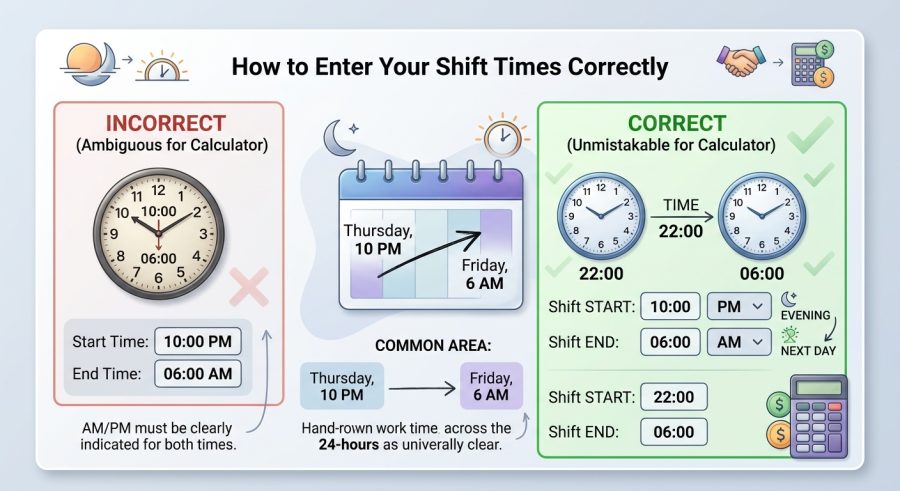
- Enter your shift start time using the 24-hour clock — for example, type 22 for 10 PM or 23.5 for 11:30 PM.
- Enter your shift end time in the same 24-hour format for the following morning — for example, 6 for 6 AM or 7.5 for 7:30 AM.
- Enter your total break time in minutes. If you take no break, leave this at 0.
- Enter your hourly wage in your local currency. Leave it at 0 if you only need total hours.
- Review your results — the calculator shows gross hours worked, break-adjusted hours, and estimated gross pay.
Understanding Each Input Field and Its Units
Shift Start Time — Enter the hour your shift begins using the 24-hour clock. Midnight is 0, noon is 12, 10 PM is 22, and 11:30 PM is 23.5. Fractions of an hour use decimals: 30 minutes equals 0.5, 15 minutes equals 0.25.
Shift End Time — Enter the hour your shift ends the following morning, again in 24-hour format. 6 AM is 6, 7:30 AM is 7.5. Because the calculator adds 24 hours internally, you do not need to adjust this number — just enter the clock time as it appears.
Total Break Time — Enter the combined length of all unpaid breaks in minutes. A single 30-minute lunch break is 30. Two 15-minute breaks total 30 as well. Paid breaks that count toward work time should be left out of this field or set to 0.
Hourly Wage — Enter your base hourly rate in dollars (or your local currency). This is used only to estimate gross pay. If you want hours only, set this to 0 and ignore the pay result.
How the Midnight Crossover Formula Works
When a shift crosses midnight, the end time on the clock is always a smaller number than the start time. The fix is to add 24 hours to the end time before subtracting the start time.
Total shift length (hours) = (End Hour + 24) − Start Hour
Net hours worked = Total shift length − (Break Minutes ÷ 60)
Estimated gross pay = Net hours worked × Hourly Wage
Variables: End Hour and Start Hour are decimal hours on the 24-hour clock; Break Minutes is total unpaid break time in minutes, divided by 60 to convert to hours; Hourly Wage is the base rate per hour.
The formula assumes the shift spans exactly one midnight crossing — that is, the worker starts one evening and finishes the next morning without working more than 24 hours. It does not apply to double shifts or shifts longer than 24 hours.
Worked Examples for Common Overnight Schedules
Example 1 — Standard 8-Hour Night Shift
Given: Start 22:00 (10 PM), End 06:00 (6 AM), Break 30 min, Wage $18/hr
Total length = (6 + 24) − 22 = 8.00 hrs
Net hours = 8.00 − (30 ÷ 60) = 8.00 − 0.50 = 7.50 hrs
Gross pay = 7.50 × $18 = $135.00
Example 2 — Short Overnight Security Shift
Given: Start 23:00 (11 PM), End 05:00 (5 AM), Break 0 min, Wage $14/hr
Total length = (5 + 24) − 23 = 6.00 hrs
Net hours = 6.00 − 0 = 6.00 hrs
Gross pay = 6.00 × $14 = $84.00
Example 3 — 12-Hour Hospital Shift
Given: Start 19:00 (7 PM), End 07:00 (7 AM), Break 60 min, Wage $32/hr
Total length = (7 + 24) − 19 = 12.00 hrs
Net hours = 12.00 − (60 ÷ 60) = 12.00 − 1.00 = 11.00 hrs
Gross pay = 11.00 × $32 = $352.00
Example 4 — Late-Start Overnight Retail Shift
Given: Start 23:30 (11:30 PM, entered as 23.5), End 07:30 (7:30 AM, entered as 7.5), Break 15 min, Wage $16.50/hr
Total length = (7.5 + 24) − 23.5 = 8.00 hrs
Net hours = 8.00 − (15 ÷ 60) = 8.00 − 0.25 = 7.75 hrs
Gross pay = 7.75 × $16.50 = $127.88
Example 5 — Warehouse Shift With Two Breaks
Given: Start 21:00 (9 PM), End 05:30 (5:30 AM, entered as 5.5), Break 45 min (two breaks combined), Wage $20/hr
Total length = (5.5 + 24) − 21 = 8.50 hrs
Net hours = 8.50 − (45 ÷ 60) = 8.50 − 0.75 = 7.75 hrs
Gross pay = 7.75 × $20 = $155.00
Common Overnight Shift Lengths at a Glance
| Start Time | End Time | Total Shift Length | Net Hours (30-min break) |
|---|---|---|---|
| 10:00 PM (22) | 6:00 AM (6) | 8.00 hrs | 7.50 hrs |
| 11:00 PM (23) | 7:00 AM (7) | 8.00 hrs | 7.50 hrs |
| 7:00 PM (19) | 7:00 AM (7) | 12.00 hrs | 11.50 hrs |
| 9:00 PM (21) | 5:00 AM (5) | 8.00 hrs | 7.50 hrs |
| 11:30 PM (23.5) | 7:30 AM (7.5) | 8.00 hrs | 7.50 hrs |
| 10:00 PM (22) | 4:00 AM (4) | 6.00 hrs | 5.50 hrs |
Reading and Applying Your Calculated Results
Total Shift Length shows the full clock time from start to end, including any breaks. Use this to confirm the shift duration your employer scheduled.
Net Hours Worked is the figure most relevant to payroll. It subtracts unpaid break time from the total shift length. This is the number of hours you should expect to be paid for at your base rate, assuming no overtime or differential applies.
Estimated Gross Pay multiplies net hours by your hourly wage. It is a pre-tax, pre-deduction estimate. It does not include overtime premiums, night-shift differentials, tips, bonuses, or any employer-specific additions. Always compare this figure against your actual pay stub and consult your employer or a payroll professional if there is a discrepancy.
Results are rounded to two decimal places. A result of 7.75 hours means 7 hours and 45 minutes. To convert the decimal portion to minutes, multiply it by 60 (0.75 × 60 = 45 minutes).
Factors That Change Your Actual Hours or Pay
Break classification — Only unpaid breaks reduce your paid hours. Paid rest breaks (common in some states and industries) should not be entered in the break field. Entering paid breaks as unpaid will undercount your hours.
Overtime rules — Many jurisdictions require overtime pay after 8 hours in a day or 40 hours in a week. This calculator uses a flat hourly rate and does not apply overtime multipliers. If your shift exceeds 8 hours, check whether overtime applies.
Shift differentials — Many employers pay a higher rate for overnight hours (for example, a 10–15% premium for hours between midnight and 6 AM). The calculator uses one flat rate and cannot split the shift into differential segments.
Rounding policies — Some employers round clock-in and clock-out times to the nearest quarter hour. If your employer does this, round your start and end times before entering them.
Time zones and daylight saving time — On the night clocks change, a shift may be one hour longer or shorter than usual. The calculator cannot detect daylight saving transitions; adjust your end time manually on those nights.
Mistakes That Produce Wrong Overnight Hour Counts
- Entering AM/PM times instead of 24-hour times — Writing 10 for 10 PM instead of 22 will produce a result of negative hours or a wildly incorrect total. Always convert to 24-hour format first.
- Entering the end time as a next-day 24-hour value above 23 — The calculator already adds 24 internally. If you enter 30 for 6 AM the next day, the result will be wrong. Just enter 6.
- Forgetting to convert minutes to the decimal format for start and end times — 11:45 PM is 23.75, not 23.45. Use the decimal equivalent of minutes (minutes ÷ 60).
- Including paid breaks in the break field — Paid breaks should not reduce your hours. Only enter unpaid break time.
- Using the gross pay result as take-home pay — The result is pre-tax. Federal, state, and local taxes plus benefit deductions will reduce your actual paycheck.
- Assuming the result includes overtime — The calculator applies one flat rate. If overtime rules apply, calculate overtime hours separately.
- Not accounting for shift differentials — If part of your shift pays at a different rate, you will need to split the shift and calculate each segment separately.
What This Calculator Cannot Do
This calculator is designed for single overnight shifts that cross midnight exactly once. It is not suitable for shifts longer than 24 hours, split shifts with multiple start and stop times, or shifts that begin and end on the same calendar day (use an 8-hour shift calculator for same-day shifts instead).
The gross pay estimate uses a single flat hourly rate. It does not calculate overtime premiums, shift differentials, statutory holiday pay, tips, commissions, or employer-mandated allowances. Tax withholding, superannuation, pension contributions, and other deductions are not included.
Labor laws governing minimum wage, overtime thresholds, mandatory break lengths, and pay periods vary by country, state, and industry. This tool provides a planning estimate only. For payroll disputes, wage claims, or employment contract questions, consult a qualified payroll professional or employment attorney.
Results depend entirely on the accuracy of the values you enter. Incorrect start times, end times, or break durations will produce incorrect results.
Converting 12-Hour AM/PM Times to 24-Hour Format
The calculator uses 24-hour (military) time because it avoids ambiguity around midnight. Here is a quick conversion guide:
- 12:00 AM (midnight) = 0
- 1:00 AM = 1, 2:00 AM = 2 … 11:00 AM = 11
- 12:00 PM (noon) = 12
- 1:00 PM = 13, 2:00 PM = 14 … 9:00 PM = 21
- 10:00 PM = 22, 11:00 PM = 23
For minutes, divide by 60 and add to the hour. 10:30 PM = 22 + (30 ÷ 60) = 22.5. 11:45 PM = 23 + (45 ÷ 60) = 23.75.
Splitting a Shift With Two Different Pay Rates
Some overnight workers earn a base rate for evening hours and a higher differential rate for hours after midnight. The calculator cannot split rates automatically, but you can handle this manually in two steps.
First, calculate the hours from your start time to midnight: subtract your start hour from 24. For a 10 PM start, that is 24 − 22 = 2 hours at the base rate.
Second, calculate the hours from midnight to your end time: that is simply your end hour in decimal form. For a 6 AM end, that is 6 hours at the differential rate.
Subtract any break time from whichever segment the break falls in, then multiply each segment by its respective rate and add the two pay figures together.
Verifying Your Pay Stub Against Calculator Results
If your estimated gross pay differs from your pay stub, check these items in order. First, confirm your employer’s recorded start and end times match what you entered. Many employers use a time-clock system that rounds to the nearest quarter hour.
Second, check whether any break time was automatically deducted by your employer’s system — some systems deduct a standard 30-minute break regardless of whether you actually took one.
Third, look for overtime, differential, or bonus line items on the stub that are not part of the base rate. If discrepancies remain after these checks, raise the issue with your payroll department. You can also use the work end time calculator with break to cross-check your scheduled finish time independently.
Overnight Shift Hours and Pay — Common Questions
Why does the calculator add 24 to the end time?
When a shift crosses midnight, the end time on the clock is numerically smaller than the start time. Subtracting directly gives a negative number. Adding 24 to the end time converts it to a continuous timeline — for example, 6 AM becomes hour 30 on a scale that started at hour 22 — so the subtraction produces the correct positive duration.
Can I use this calculator for a shift that does not cross midnight?
No. The formula always adds 24 to the end time, which would overcount hours for a same-day shift. For shifts that start and end on the same calendar day, use a standard 8-hour shift calculator instead, which handles same-day time subtraction correctly.
How do I enter a time like 11:45 PM?
Convert minutes to a decimal by dividing by 60. 45 minutes ÷ 60 = 0.75. So 11:45 PM in 24-hour format is 23.75. Similarly, 10:30 PM is 22.5 and 6:15 AM is 6.25. The calculator’s step is set to 0.25, matching quarter-hour increments.
Does the gross pay result include taxes?
No. The estimated gross pay is a pre-tax figure calculated by multiplying net hours by your hourly wage. Federal, state, and local income taxes, Social Security, Medicare, and any benefit deductions are not applied. Your actual take-home pay will be lower. Consult a payroll professional for net pay estimates.
What if my employer pays a night-shift differential?
The calculator uses one flat hourly rate and cannot apply split rates automatically. To account for a differential, calculate the hours before and after midnight separately, multiply each segment by its applicable rate, and add the two amounts together. See the topic section above on splitting a shift with two pay rates for a step-by-step method.
How accurate is the net hours result?
The result is mathematically exact based on the values you enter. Accuracy depends entirely on entering the correct start time, end time, and break duration. If your employer rounds clock times or applies automatic break deductions, your actual paid hours may differ slightly from the calculator’s output.
What happens on daylight saving time nights?
When clocks fall back one hour, an overnight shift is effectively one hour longer than the clock times suggest. When clocks spring forward, the shift is one hour shorter. The calculator cannot detect these transitions. On those nights, manually add or subtract one hour from your end time before entering it.
Can I calculate hours for a shift longer than 12 hours?
Yes, as long as the shift crosses midnight only once and is shorter than 24 hours. For example, a shift from 7 PM (19) to 7 AM (7) correctly returns 12 hours. The formula works for any overnight duration up to just under 24 hours. Shifts of exactly 24 hours or longer are outside the calculator’s intended scope.
Plan Every Night Shift With Confidence
Overnight shifts create a simple but frustrating arithmetic problem that this calculator solves in seconds. Enter your start time, end time, break duration, and hourly wage in 24-hour decimal format, and you get net hours worked and an estimated gross pay figure you can compare against your schedule or pay stub. For payroll disputes or questions about overtime and differential pay, always verify results with your employer’s payroll department or a qualified professional.

2 Responses