
This calculator shows how many posts your pole barn needs along each wall, the exact on-center spacing that results, and a snow-load-adjusted maximum spacing guideline. Enter your building’s length, width, desired post spacing, and maximum allowed spacing, all in the same unit (feet or meters). The calculator rounds up to whole spacing intervals per wall, then divides the wall length evenly to give you a buildable, symmetrical post layout.
Pole Barn Post Spacing Calculator – Layout & Post Count
Calculate the number of posts, actual on-center spacing, and a snow-load-adjusted maximum spacing guideline for your pole barn layout.
What This Post Layout Tool Figures Out
This tool calculates a practical post layout for a pole barn or post-frame building. It figures out how many posts fit along each wall, the true on-center spacing after rounding to whole intervals, the total number of unique perimeter posts, and a snow-load-adjusted maximum spacing guideline for early planning.
It is useful for homeowners sketching a barn layout, hobby farmers budgeting materials, and contractors preparing rough estimates before an engineer finalizes plans. The results are planning estimates, not engineered specifications, since actual spacing limits depend on truss design, wind exposure, soil conditions, and local code requirements.
Steps to Calculate Your Post Layout
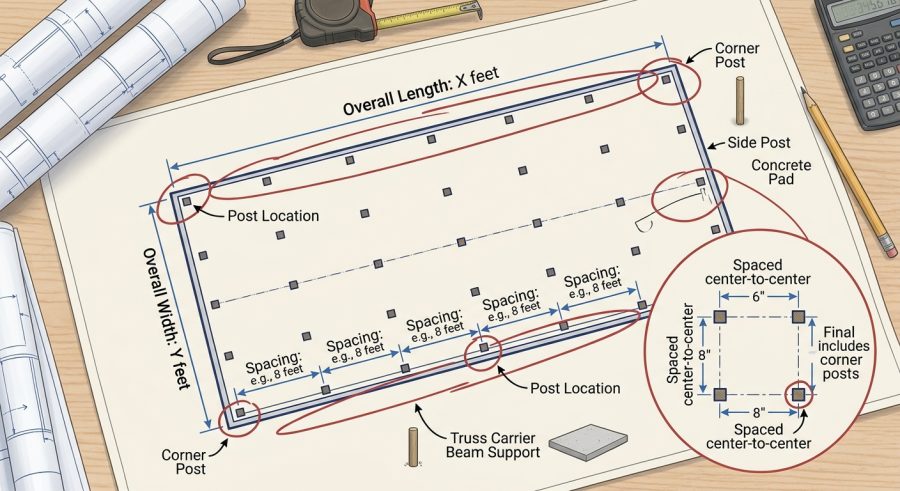
- Measure or plan your building’s overall length and width, then enter both in the same unit.
- Enter your desired post spacing, typically between 4 and 12 feet on center for most pole barns.
- Enter the maximum spacing allowed by your engineered plans or local building code.
- Select your roof snow load level from the dropdown to see a load-adjusted spacing guideline.
- Review the post counts, actual spacing, and total perimeter posts shown in the results.
- Adjust the desired spacing value until the actual on-center spacing feels practical for your layout.
Entering Building Dimensions and Spacing Limits
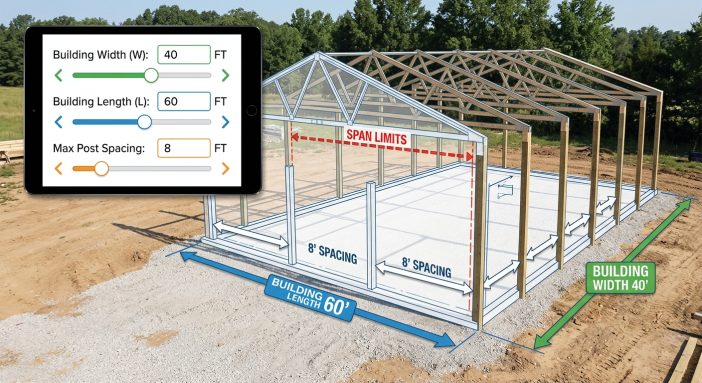
Building Length and Building Width are the outside dimensions of your barn in feet, entered separately since most barns are rectangular with different post counts on each side.
Desired Post Spacing is the on-center distance you would like between posts, usually between 4 and 12 feet for typical post-frame construction. This is the target the calculator uses to figure out how many intervals fit per wall.
Maximum Allowed Spacing is the largest spacing permitted by your engineered plans or local building code, generally between 4 and 14 feet. This value is used only as the base for the snow-load adjustment, not as a limit on your desired spacing input.
Roof Snow Load Level is a simple category selector: Light, Moderate, or Heavy. Each option applies a different reduction factor (1.0, 0.9, or 0.8) to your maximum allowed spacing, reflecting that heavier snow loads generally call for closer post placement.
How Post Count and Spacing Are Calculated
All lengths must use the same unit, either feet or meters, since the calculator performs no unit conversion. Let L be building length, W be building width, S be desired post spacing, M be maximum allowed spacing, and F be the snow load factor (1.0, 0.9, or 0.8).
Posts Along Length = ceil(L / S) + 1. This counts the number of spacing intervals rounded up, then adds one post to account for both endpoints of the wall.
Posts Along Width = ceil(W / S) + 1, using the same logic for the shorter wall.
Actual On-Center Spacing (Length) = L / ceil(L / S). Dividing the full wall length by the rounded interval count spreads posts evenly, so the true spacing is usually slightly less than your desired value.
Actual On-Center Spacing (Width) = W / ceil(W / S), calculated the same way for the width.
Total Perimeter Posts = 2 x (ceil(L / S) + ceil(W / S)). This counts each corner post only once around the full rectangle, rather than double-counting corners shared by two walls.
Snow-Load Adjusted Maximum Spacing = M x F. This reduces your stated maximum spacing by 10 percent for moderate snow regions or 20 percent for heavy snow regions, giving a more conservative planning figure.
Sample Layouts for Different Building Sizes
Example 1: Standard 40 x 30 barn
- Given: Length 40 ft, Width 30 ft, Desired spacing 8 ft, Max allowed 10 ft, Snow load Light (1.0)
- Formula: ceil(L/S)+1 for each wall; L/ceil(L/S) for actual spacing
- Substitution: ceil(40/8)+1 = 6; ceil(30/8)+1 = 5; 40/5 = 8.00; 30/4 = 7.50
- Calculation: Total perimeter posts = 2 x (5+4) = 18; Snow adjusted max = 10 x 1.0 = 10.00 ft
- Final result: 6 posts along length, 5 posts along width, 18 total perimeter posts, actual spacing 8.00 ft and 7.50 ft
Example 2: Larger 60 x 40 barn
- Given: Length 60 ft, Width 40 ft, Desired spacing 10 ft, Max allowed 12 ft, Snow load Moderate (0.9)
- Formula: Same formulas as above
- Substitution: ceil(60/10)+1 = 7; ceil(40/10)+1 = 5; 60/6 = 10.00; 40/4 = 10.00
- Calculation: Total perimeter posts = 2 x (6+4) = 20; Snow adjusted max = 12 x 0.9 = 10.80 ft
- Final result: 7 posts along length, 5 posts along width, 20 total perimeter posts, actual spacing 10.00 ft both walls
Example 3: Small 36 x 24 barn in heavy snow
- Given: Length 36 ft, Width 24 ft, Desired spacing 8 ft, Max allowed 10 ft, Snow load Heavy (0.8)
- Substitution: ceil(36/8)+1 = 6; ceil(24/8)+1 = 4; 36/5 = 7.20; 24/3 = 8.00
- Calculation: Total perimeter posts = 2 x (5+3) = 16; Snow adjusted max = 10 x 0.8 = 8.00 ft
- Final result: 6 posts along length, 4 posts along width, 16 total perimeter posts, actual spacing 7.20 ft and 8.00 ft
Example 4: Square 50 x 50 building
- Given: Length 50 ft, Width 50 ft, Desired spacing 9 ft, Max allowed 10 ft, Snow load Light (1.0)
- Substitution: ceil(50/9)+1 = 7 for both walls; 50/6 = 8.33 ft
- Calculation: Total perimeter posts = 2 x (6+6) = 24; Snow adjusted max = 10 x 1.0 = 10.00 ft
- Final result: 7 posts on each wall, 24 total perimeter posts, actual spacing 8.33 ft on all sides
Example 5: Small shed-size 24 x 16 building
- Given: Length 24 ft, Width 16 ft, Desired spacing 8 ft, Max allowed 8 ft, Snow load Moderate (0.9)
- Substitution: ceil(24/8)+1 = 4; ceil(16/8)+1 = 3; 24/3 = 8.00; 16/2 = 8.00
- Calculation: Total perimeter posts = 2 x (3+2) = 10; Snow adjusted max = 8 x 0.9 = 7.20 ft
- Final result: 4 posts along length, 3 posts along width, 10 total perimeter posts, actual spacing matches desired spacing exactly at 8.00 ft
Common Spacing Results by Building Size
The table below shows typical results using an 8 ft desired post spacing. These figures assume rectangular buildings with no interior posts and are meant only to illustrate how post counts scale with size, not to replace a calculation with your own dimensions.
| Building Size (ft) | Posts Along Length | Posts Along Width | Total Perimeter Posts |
|---|---|---|---|
| 24 x 24 | 4 | 4 | 16 |
| 30 x 40 | 6 | 5 | 22 |
| 40 x 60 | 6 | 8 | 28 |
| 60 x 100 | 8 | 13 | 42 |
Reading Your Post Count and Spacing Results
Posts Along Length and Posts Along Width tell you how many posts sit on each wall, including both corner posts. These numbers are always whole posts, rounded up so no interval exceeds your desired spacing.
Actual On-Center Spacing for each wall shows the true distance between posts once the wall length is divided evenly. This value is usually slightly smaller than your desired spacing because the calculator rounds intervals up, then redistributes the length.
Total Perimeter Posts counts every unique post around the building, so shared corner posts are not counted twice. Use this for a rough material count before adding any interior posts your design may require.
Snow-Load Adjusted Maximum Spacing is a secondary, conservative figure. It is not a code requirement, but a simple planning guideline suggesting closer spacing in snowier regions. Compare it to your actual spacing results to see if your layout falls within a reasonable range.
What Changes Your Post Layout Numbers
Wall length and width directly control how many spacing intervals fit and are fully accounted for in every result.
Desired spacing choice changes both post counts and actual spacing; shorter desired spacing increases post count but reduces the gap between rounding-based actual spacing and your target.
Snow load level only affects the adjusted maximum spacing result, not the post count or actual spacing calculations, since those are based on your desired spacing input.
Interior or bearing posts for large spans, roof trusses, or door openings are not counted by this calculator and must be added manually based on your building design.
Wind load, soil bearing capacity, and frost depth materially affect real-world spacing limits but are not factored into this tool, since they require site-specific engineering data.
Layout Planning Errors to Avoid
- Mixing units: Entering length in feet and width in meters produces meaningless results; always use one consistent unit.
- Treating desired spacing as final: The actual on-center spacing result, not your input, is the true buildable spacing after rounding.
- Ignoring interior posts: This calculator only counts perimeter posts; large buildings often need interior support posts too.
- Skipping engineering review: Snow load, wind, and soil factors can require tighter spacing than shown here.
- Assuming the snow-adjusted figure is a code limit: It is a conservative planning guideline, not an official maximum spacing standard.
- Forgetting door and window openings: Openings often require additional framing posts that this basic layout does not calculate.
- Using extreme spacing values: Spacing far outside typical 4 to 12 foot ranges may not reflect standard construction practice.
What This Tool Does Not Cover
This calculator performs basic geometric division to estimate post counts and spacing. It does not evaluate wind load, snow load in engineering detail, soil bearing capacity, frost depth, footing size, or post embedment depth. It also does not add interior posts, door header posts, or posts required around large openings.
Building codes and engineering requirements vary by region, and actual required spacing may be tighter than the numbers shown here. This tool is intended for early planning and rough material estimates only. Always consult a structural engineer or licensed contractor and verify your final layout against local building codes before construction begins.
Why Even Spacing Matters More Than Exact Targets
Pole barn walls rarely divide evenly by a chosen spacing number, which is why the actual on-center spacing result matters more than your original target. Spreading the slight difference evenly across the wall keeps every bay the same width, which simplifies framing, siding, and truss alignment. A layout with one short bay and several longer ones is harder to build and can create uneven load paths.
Matching Post Spacing to Truss and Purlin Spans
Post spacing works together with your roof truss spacing and wall girt or purlin spans. Wider post spacing means longer unsupported spans for these framing members, which can require larger lumber sizes or added blocking. This calculator does not evaluate truss or purlin sizing, so confirm your desired spacing works with your specific framing plan before finalizing material orders.
Adjusting Plans for Snow and Wind Regions
In regions with heavy snow loads, roofs carry significantly more weight, and closer post spacing helps distribute that load across more support points. This calculator’s snow load selector applies a simple percentage reduction to your maximum allowed spacing as a planning guideline. It does not calculate actual snow load values in pounds per square foot, wind exposure categories, or code-specific requirements, which vary by location and must come from an engineer or local code office.
Pole Barn Spacing Questions Answered
Is this calculator a substitute for an engineered pole barn plan?
No. This tool provides early planning estimates only. Final post spacing, sizing, and embedment depth should be verified by a structural engineer or licensed professional and must comply with local building codes and site-specific soil and load conditions.
Why does the actual on-center spacing differ from my desired spacing?
Wall lengths rarely divide evenly by your target spacing, so the calculator rounds up to a whole number of intervals and redistributes the total length evenly, which slightly changes the exact spacing between posts.
How does snow load affect post spacing?
Heavier snow loads increase the weight the roof structure must transfer to the posts, so many designs use closer post spacing in high-snow regions to reduce the load carried between each post. This calculator applies a simple adjustment factor for early planning only.
Does this calculator include interior posts or door opening posts?
No. It only calculates perimeter post counts based on building length and width. Interior support posts, header posts around large openings, and posts for interior partitions must be planned separately based on your specific building design.
What units should I use for length and spacing?
You can use feet or meters, but every length field must use the same unit for the results to make sense. The calculator does not convert between unit systems, so mixing feet and meters will produce inaccurate results.
Can I use this calculator for buildings other than pole barns?
Yes, the same math applies to any rectangular post-frame structure, such as pavilions, sheds, or agricultural buildings, as long as post spacing follows a similar even, on-center pattern around the perimeter.
Why is the total perimeter post count not simply the sum of both wall post counts doubled?
Each corner post is shared by two walls. The formula adds the length and width interval counts, then doubles that sum, which correctly counts each corner post only once instead of twice.
How accurate are the results from this calculator?
The math itself is exact for the inputs provided, but the results are planning estimates. They do not account for engineering factors like wind load, soil conditions, or code-specific spacing limits, so treat them as a starting point rather than a final design.
Planning Your Next Steps
Use this calculator to sketch a workable post layout, compare spacing options, and get a rough perimeter post count before finalizing your pole barn design. Treat the snow-load adjusted spacing as a planning cue rather than a code value. For final construction, confirm post spacing, sizing, and depth with a structural engineer or licensed contractor familiar with your local building requirements.

One Response