
This aluminum plate weight calculator instantly estimates plate weight in kilograms and pounds, along with total volume and surface area, based on your plate’s length, width, thickness, alloy density, and quantity. Choose millimeters or inches, pick a common alloy like 6061 or 5052, then enter your dimensions below to get accurate results for shipping, costing, or fabrication planning.
Aluminum Plate Weight Calculator: Get KG, LB & Volume Fast
Estimate aluminum plate weight, volume, and surface area in metric or imperial units for any common alloy and quantity.
What This Aluminum Plate Weight Tool Calculates
This tool calculates the weight, volume, and surface area of a flat rectangular aluminum plate using its length, width, thickness, alloy, and quantity. It is built for metal fabricators, machinists, engineers, procurement staff, and hobbyists who need a fast estimate before ordering material, quoting a job, or planning shipping costs.
Results are estimates based on nominal alloy densities and ideal rectangular geometry. They are accurate enough for costing, freight planning, and general shop use, but they are not a substitute for a certified mill test report or a scale reading when exact weight matters.
Steps to Estimate Your Plate Weight
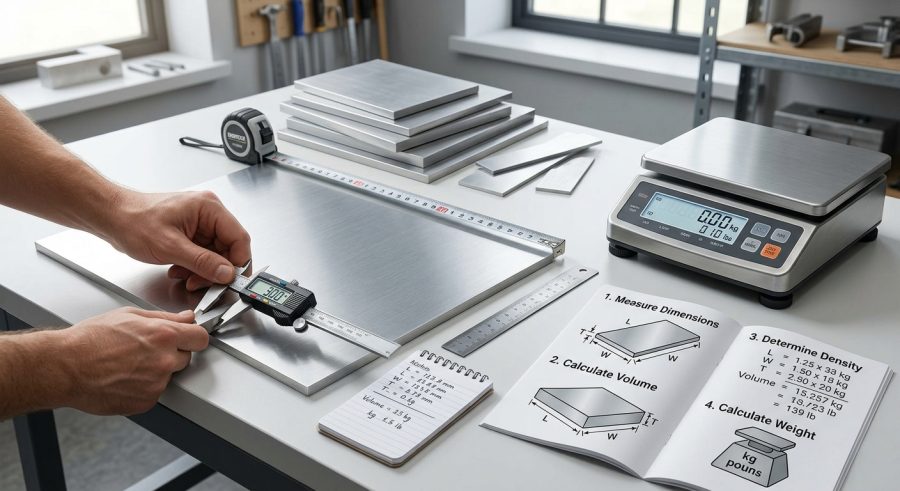
- Select your dimension unit: millimeters or inches.
- Enter the plate’s length, width, and thickness in that unit.
- Choose the aluminum alloy from the list to set the correct density.
- Enter the number of identical plates you need weighed.
- Review the volume, per-plate weight, total weight in kg and lb, and total surface area.
Understanding Each Input Field
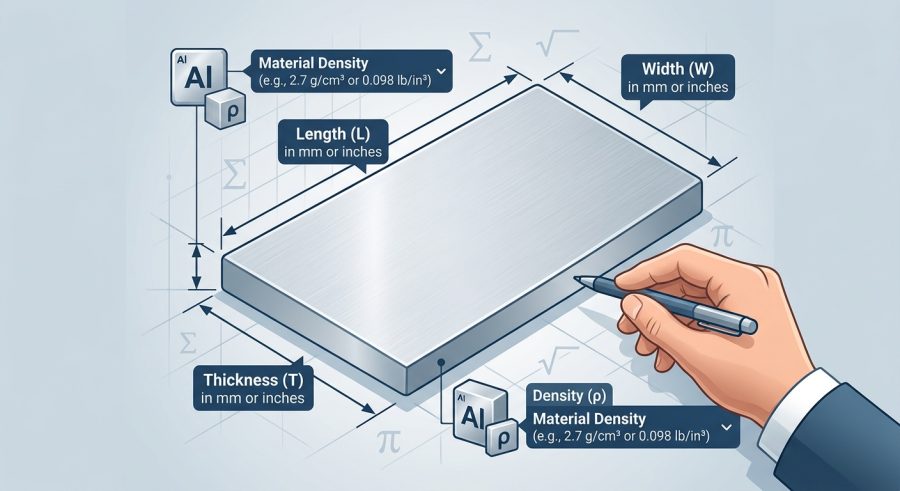
Dimension Unit lets you enter measurements in millimeters or inches. Choosing inches automatically converts your length, width, and thickness to millimeters internally using 25.4 millimeters per inch.
Plate Length and Plate Width are the two flat face dimensions of the plate, entered in the unit you selected.
Plate Thickness is the plate’s depth, also in your selected unit. Even small thickness errors change the weight noticeably because thickness is a direct multiplier in the volume calculation.
Aluminum Alloy sets the density used in the weight formula. Each alloy option lists its nominal density in grams per cubic centimeter, since alloys like 7075 are noticeably denser than 5052 or 6061.
Number of Plates lets you calculate totals for a batch order instead of repeating the calculation one plate at a time.
The Math Behind Plate Weight and Volume
The calculator first converts all dimensions to millimeters, then works through the following steps.
Volume (cm3) = (length_mm * width_mm * thickness_mm) / 1000, where dividing by 1000 converts cubic millimeters to cubic centimeters.
Weight per plate (kg) = Volume (cm3) * alloy density (g/cm3) / 1000, since density in grams per cubic centimeter gives a result in grams that must be divided by 1000 to reach kilograms.
Total weight (kg) = Weight per plate * quantity.
Total weight (lb) = Total weight (kg) * 2.20462262, the standard kilogram-to-pound conversion factor.
Surface area (m2) = (length_mm * width_mm * quantity) / 1,000,000, giving the combined one-side area of all plates, since one square meter equals 1,000,000 square millimeters.
These formulas assume solid, uniform, rectangular plates with no holes, bevels, or cutouts, and they use nominal alloy densities rather than a specific mill’s certified value.
Sample Calculations for Common Plate Sizes
Example 1: Standard 6061-T6 plate. Given: length 1000 mm, width 500 mm, thickness 10 mm, alloy 6061-T6 (2.70 g/cm3), quantity 1. Formula: weight = volume x density / 1000. Substitution: volume = (1000 x 500 x 10) / 1000 = 5000 cm3. Calculation: weight = 5000 x 2.70 / 1000 = 13.5 kg. Final result: 13.5 kg (29.76 lb), with 0.5 m2 of surface area.
Example 2: Inch-based 5052 plates, quantity 2. Given: length 48 in, width 24 in, thickness 0.5 in, alloy 5052 (2.68 g/cm3), quantity 2. Substitution: converted to mm, this is 1219.2 x 609.6 x 12.7. Calculation: volume per plate is about 9438.95 cm3, weight per plate is about 25.30 kg. Final result: total weight is about 50.59 kg (111.54 lb), total volume about 18,877.90 cm3, and surface area about 1.486 m2.
Example 3: Large 7075 batch, quantity 5. Given: length 2000 mm, width 1000 mm, thickness 25 mm, alloy 7075 (2.81 g/cm3). Calculation: weight per plate = (2000 x 1000 x 25 / 1000) x 2.81 / 1000 = 140.5 kg. Final result: total weight is 702.5 kg (1548.75 lb), total volume 250,000 cm3, and surface area 10 m2.
Example 4: Small 6063 plates, quantity 10. Given: length 100 mm, width 100 mm, thickness 3 mm, alloy 6063 (2.70 g/cm3). Calculation: weight per plate = (100 x 100 x 3 / 1000) x 2.70 / 1000 = 0.081 kg. Final result: total weight is 0.81 kg (1.79 lb), total volume 300 cm3, and surface area 0.1 m2.
Aluminum Alloy Density Reference Chart
| Alloy | Density (g/cm3) | Density (lb/in3) | Typical Use |
|---|---|---|---|
| 6061-T6 | 2.70 | 0.0975 | Structural parts, fixtures, machined components |
| 5052 | 2.68 | 0.0968 | Sheet metal forming, marine parts, enclosures |
| 6063 | 2.70 | 0.0975 | Extrusions, architectural trim, frames |
| 3003 | 2.73 | 0.0986 | Cookware, chemical tanks, general sheet work |
| 7075 | 2.81 | 0.1015 | Aerospace parts, high-strength tooling |
| 1100 | 2.71 | 0.0979 | Chemical equipment, reflectors, low-strength forming |
Density values are nominal averages and can vary slightly by supplier, temper, and production batch.
Reading Your Weight, Volume, and Area Results
Total Volume is the combined volume of all plates in cubic centimeters, useful for material stock checks or melt calculations.
Weight Per Plate shows the weight of a single plate in kilograms, helpful when quoting or handling one piece at a time.
Total Weight (kg) and Total Weight (lb) give the full batch weight in both unit systems, useful for freight quotes, load limits, and purchase orders that specify pounds or kilograms.
Surface Area (One Side, Total) reports the combined one-face area in square meters, which is useful for estimating anodizing, painting, or coating coverage. Results round to the decimal places shown and represent estimates based on nominal density and ideal geometry, not a certified weight.
What Changes Your Calculated Weight
- Thickness accuracy: the calculator accounts for whatever thickness value you enter, but real plate stock can vary within standard mill tolerances, which this tool cannot detect.
- Alloy density: accounted for through the alloy selector, since different alloys and tempers have measurably different densities.
- Quantity: accounted for directly, scaling volume, weight, and surface area for batch orders.
- Cutouts, holes, and bevels: not accounted for, since the formula assumes a solid rectangular plate.
- Coatings, cladding, or protective film: not accounted for, so actual shipped weight may be slightly higher.
- Unit selection: accounted for through the dimension unit field, which converts inches to millimeters before calculation.
Errors to Avoid When Entering Plate Data
- Mixing units: entering length in millimeters and width in inches without changing the unit selector produces incorrect results. Set the unit once for all three dimensions.
- Forgetting quantity: leaving quantity at 1 when ordering multiple plates understates total weight and volume.
- Wrong alloy selection: choosing a similar-sounding alloy with a different density can shift weight by a few percent.
- Confusing nominal and actual thickness: mill stock often runs slightly over or under nominal thickness, which this calculator cannot correct for.
- Ignoring coatings: anodized or painted plates weigh a little more than the bare metal calculation shows.
- Decimal input errors: typing thickness as 10 when you mean 1.0 mm will inflate the weight roughly tenfold.
- Assuming exact certification weight: this tool gives an engineering estimate, not a certified mill weight for legal or contractual purposes.
Assumptions and Where Estimates Fall Short
This calculator handles solid, flat, rectangular aluminum plates only. It does not model round, perforated, beveled, or irregularly shaped plates, and it does not subtract material for holes or cutouts. Density values are nominal figures for common alloys and can vary by supplier, temper, and manufacturing batch. Results do not include coatings, cladding, or protective films.
For structural design, load-bearing applications, or contractual weight guarantees, consult a qualified engineer or your material supplier’s certified mill test report rather than relying solely on this estimate.
Converting Metric and Imperial Plate Measurements
The dimension unit field handles conversion automatically. Selecting inches multiplies every length value by 25.4 to get millimeters before any volume or weight math runs. This means you never need to convert measurements by hand, and you can switch between metric and imperial project drawings without recalculating anything manually. The same logic applies to output units, since total weight is shown in both kilograms and pounds using the standard 2.20462262 conversion factor.
Using Weight Results for Shipping and Costing
Total weight in kilograms or pounds is often the number a freight carrier or supplier needs for a quote. Surface area is useful for coating or anodizing estimates, while total volume helps confirm raw stock requirements before cutting. If you also work with other metal shapes, a steel plate weight calculator or a pipe weight per foot calculator can help you compare material weight across different metals and profiles for the same project.
Picking the Right Alloy for Your Job
Alloy choice affects both weight and mechanical properties. 6061-T6 is a common general-purpose structural choice, 5052 suits sheet forming and marine use, 3003 is favored for cookware and tanks, and 7075 offers higher strength for aerospace or high-load tooling at a slightly higher density. If you are unsure which alloy your project requires, check with your material supplier or a qualified engineer before finalizing an order.
Aluminum Plate Weight Questions Answered
How accurate is this aluminum plate weight calculator?
It is accurate for ideal solid rectangular plates using nominal alloy densities. Real-world weight can differ slightly due to mill tolerances, coatings, or cutouts, so treat the result as a close engineering estimate rather than a certified mill weight.
Why does alloy selection change the weight so much?
Different alloys pack atoms slightly differently, so density varies from about 2.68 g/cm3 for 5052 to 2.81 g/cm3 for 7075. Since weight is volume multiplied by density, a denser alloy always weighs more for the same size plate.
Can I use this calculator for non-rectangular plates?
Not directly. The formula assumes a solid rectangle, so round, perforated, or irregularly shaped plates will weigh less than the calculated figure because material is missing from the ideal rectangular volume.
What if my plate thickness is not a round number like 6 mm?
Enter the exact decimal thickness, such as 6.35 mm, and the calculator will use that precise value in the volume and weight formulas without rounding your input.
Does the calculator account for anodizing or paint coatings?
No, results reflect bare aluminum only. Anodized, painted, or clad plates will weigh a small amount more than the calculated figure, though the difference is usually negligible for costing purposes.
How do I convert the total weight to tons for a large order?
Divide the Total Weight (kg) result by 1000 for metric tons, or divide Total Weight (lb) by 2000 for US short tons, since the calculator already provides both kilogram and pound totals.
Why is my calculated weight different from the supplier's invoice?
Suppliers often use actual measured thickness and their own certified density, while this tool uses nominal thickness and standard alloy density. Small mill tolerances on thickness can shift the true weight by a few percent.
Can I calculate weight for a single plate and a full batch at once?
Yes, set Number of Plates to 1 to see per-plate volume and weight, then increase it to your order quantity to instantly see the batch totals in the same result set.
Putting Your Plate Weight Estimate to Work
This calculator gives you a fast, reliable estimate of aluminum plate weight, volume, and surface area for any common alloy and unit system. Use it to plan material orders, estimate freight costs, or budget a fabrication job. For contractual or safety-critical weight figures, always confirm with your supplier’s certified mill data.
