
This calculator estimates the weight of expanded metal sheets by combining sheet length, width, thickness, material density, and open area percentage. Enter your sheet dimensions, choose a material, and set the open area percentage to instantly see the solid-equivalent weight, expanded weight per sheet, total order weight, and weight per square foot. These results help with material ordering, shipping estimates, and cost planning for fabrication or construction projects.
Expanded Metal Weight Calculator – Estimate Sheet Weight
Estimate expanded metal sheet weight using length, width, thickness, material density, and open area percentage for accurate ordering and shipping planning.
What This Expanded Metal Weight Tool Calculates
This tool calculates the estimated weight of expanded metal sheets used in fencing, walkways, security screens, filtration, and architectural panels. It works by first finding the weight of a solid sheet the same size, then reducing that number based on how much material was removed during the slitting and stretching process. Fabricators, estimators, architects, and buyers use this calculator to plan material orders, budget shipping costs, and compare weight across different metals and mesh styles. Because material density, thickness tolerances, and open area vary by manufacturer, the results are planning-level estimates rather than certified figures.
Steps to Estimate Your Sheet Weight
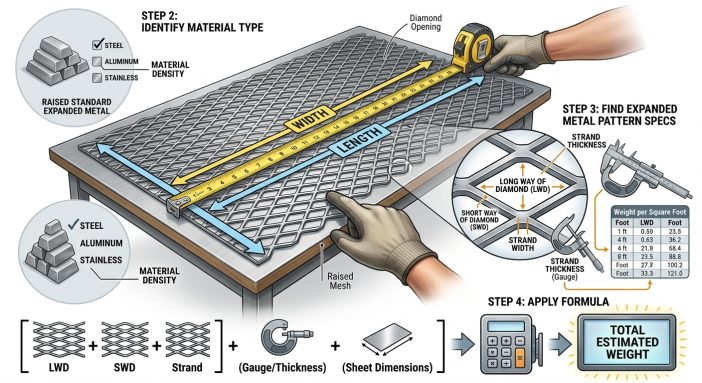
- Enter the sheet length and width in feet.
- Enter the raw material thickness in inches, measured before slitting and stretching.
- Select the material type to set the correct density.
- Adjust the open area percentage slider to match your expanded metal style.
- Enter the number of sheets needed for your order.
- Review the sheet area, solid weight, expanded weight, total order weight, and weight per square foot.
Understanding Each Input Field
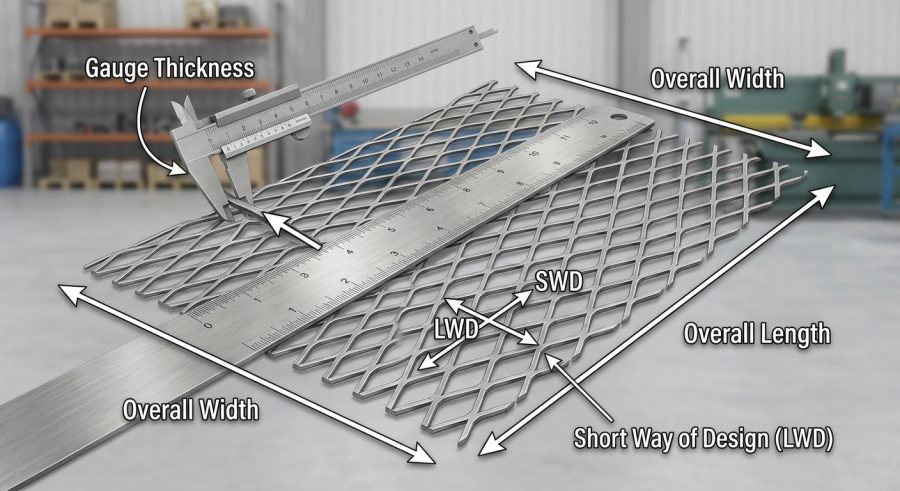
Sheet Length and Sheet Width are the outer dimensions of the expanded metal sheet, entered in feet. Together they set the total surface area used in every weight calculation.
Raw Material Thickness is the thickness of the flat metal coil or sheet before it gets slit and pulled into the diamond or mesh pattern, entered in inches. This is not the finished profile height of the expanded pattern.
Material Density lets you choose steel, aluminum, stainless steel, or copper. Each option carries a typical density value in pounds per cubic foot, which converts sheet volume into weight.
Open Area Percentage represents the share of the sheet that becomes open space once the metal is expanded. A higher percentage means less remaining metal and a lighter sheet. Common expanded metal styles fall between 25 percent and 75 percent open area.
Number of Sheets multiplies the single-sheet weight to estimate the total weight for an entire order, which is useful for freight and pallet planning.
The Math Behind Expanded Metal Weight
The calculator starts by treating the sheet as if it were solid metal, then adjusts for the material removed during expansion.
Sheet Area = length_ft multiplied by width_ft, giving the flat surface area in square feet.
Solid Sheet Weight = length_ft multiplied by width_ft multiplied by (thickness_in divided by 12) multiplied by material_density. Dividing thickness by 12 converts inches to feet so all dimensions share the same unit before multiplying by density in pounds per cubic foot.
Expanded Metal Weight per Sheet = Solid Sheet Weight multiplied by (1 minus open_area_percent divided by 100). This step removes the percentage of material lost to slitting and stretching.
Total Weight for Order = Expanded Metal Weight per Sheet multiplied by quantity.
Weight per Square Foot = Expanded Metal Weight per Sheet divided by Sheet Area, giving a normalized value for comparing different sheet sizes or mesh styles. This approach assumes uniform thickness and density across the sheet and does not account for coatings, galvanizing, or edge trimming.
Sample Calculations for Different Materials
Example 1 – Steel diamond mesh
Given: length 8 ft, width 4 ft, thickness 0.075 in, density 490 lb/ft3, open area 55 percent, quantity 1.
Formula: Solid Weight = 8 x 4 x (0.075/12) x 490.
Substitution: 32 x 0.00625 x 490 = 98.00 lb.
Expanded weight = 98.00 x (1 – 0.55) = 44.10 lb.
Final result: 44.10 lb per sheet, 1.378 lb/sq ft.
Example 2 – Aluminum sheets, bulk order
Given: length 10 ft, width 3 ft, thickness 0.1 in, density 169 lb/ft3, open area 60 percent, quantity 5.
Substitution: Solid Weight = 10 x 3 x (0.1/12) x 169 = 30 x 0.008333 x 169 = 42.25 lb.
Expanded weight per sheet = 42.25 x 0.40 = 16.90 lb.
Final result: Total order weight = 16.90 x 5 = 84.50 lb.
Example 3 – Stainless steel, small panels
Given: length 6 ft, width 2 ft, thickness 0.05 in, density 500 lb/ft3, open area 50 percent, quantity 10.
Substitution: Solid Weight = 6 x 2 x (0.05/12) x 500 = 12 x 0.004167 x 500 = 25.00 lb.
Expanded weight per sheet = 25.00 x 0.50 = 12.50 lb.
Final result: Total order weight = 125.00 lb.
Example 4 – Copper decorative screen
Given: length 4 ft, width 4 ft, thickness 0.06 in, density 556 lb/ft3, open area 40 percent, quantity 2.
Substitution: Solid Weight = 4 x 4 x (0.06/12) x 556 = 16 x 0.005 x 556 = 44.48 lb.
Expanded weight per sheet = 44.48 x 0.60 = 26.69 lb.
Final result: Total order weight = 53.38 lb, or 1.668 lb/sq ft.
Typical Density and Open Area Reference Chart
| Material | Typical Density (lb/ft3) | Common Open Area Range | Typical Use |
|---|---|---|---|
| Steel | 490 | 25% – 75% | Fencing, flooring, security mesh |
| Aluminum | 169 | 30% – 70% | Lightweight panels, walkways |
| Stainless Steel | 500 | 25% – 65% | Filtration, marine, food-grade uses |
| Copper | 556 | 35% – 60% | Decorative screens, architectural facades |
These density and open area figures are general industry averages. Always confirm exact values with the manufacturer’s spec sheet for a specific product line.
Reading Your Weight Results
The Sheet Area shows the flat footprint of one sheet in square feet, based on length and width alone. The Solid Sheet Weight is a baseline figure showing what the sheet would weigh if no metal were removed, which helps you see how much weight the expansion process saves. The Expanded Metal Weight per Sheet is the main practical output, reflecting the actual estimated weight of one finished sheet. The Total Weight for Order multiplies that figure by quantity for shipping and pallet planning. The Weight per Square Foot is useful for comparing sheets of different sizes or open area percentages on an equal basis. All results are estimates and should be rounded appropriately for quoting or freight classification.
What Changes Expanded Metal Weight Estimates
Thickness accuracy matters most, since weight scales directly with it; even small measurement errors shift results noticeably. Material density varies slightly by alloy grade, so the calculator’s preset values represent typical averages rather than certified figures. Open area percentage is user-entered and depends on the specific mesh pattern, strand width, and manufacturing process, so an inaccurate estimate will directly skew the expanded weight. Quantity is a simple multiplier and does not affect per-sheet accuracy. Coatings such as galvanizing or paint are not included in this calculator. For comparison, similar density-based weight logic applies to flat products, as shown in the steel plate weight calculator and the pipe weight per foot calculator, which also rely on volume and density rather than a manufacturer’s finished-product chart.
Common Errors When Estimating Sheet Weight
- Entering finished pattern height instead of raw thickness: use the flat sheet gauge before expansion, not the diamond profile height.
- Guessing the open area percentage: check the product spec sheet or mesh style chart instead of estimating blindly.
- Mixing units: length and width must be in feet and thickness in inches, or the weight will be off by a large factor.
- Using generic density for a specific alloy: some steel or aluminum grades vary slightly from the preset averages.
- Forgetting quantity: leaving quantity at 1 when ordering multiple sheets will understate total shipping weight.
- Ignoring coatings: galvanizing, paint, or plating adds extra weight not included in this estimate.
- Rounding too early: round only the final result, not intermediate values, to avoid compounding errors.
Scope and Accuracy Limits of This Tool
This calculator provides planning-level estimates based on standard geometry and typical material densities. It does not account for coatings, surface treatments, manufacturing tolerances, or strand-level details like specific mesh pattern geometry. Density values are general averages and may differ from a specific alloy or manufacturer’s certified data. Results should not be used as a substitute for a manufacturer’s official weight chart or certified mill test report when precision matters for structural, load-bearing, or shipping-critical applications. For engineering decisions, load calculations, or regulatory compliance, consult a qualified structural engineer or the product manufacturer directly.
Choosing an Accurate Open Area Percentage
Open area percentage is the hardest input to estimate correctly because it depends on the mesh style, strand width, and how far the metal was stretched during manufacturing. Standard diamond patterns commonly range from 25 percent to 75 percent open area, with tighter patterns used for security screens and wider patterns used for walkways or decorative panels. If you have a product code or spec sheet, use the manufacturer’s listed open area value instead of guessing, since even a 10 percentage point difference can shift the final weight noticeably.
Converting Results to Metric Weight Units
This calculator outputs weight in pounds and area in square feet. To convert pounds to kilograms, multiply the result by 0.453592. To convert weight per square foot to kilograms per square meter, multiply the lb/sq ft value by 4.88243. These conversions let international buyers compare results against metric spec sheets without changing the calculator’s default unit system.
Comparing Expanded Metal to Solid Sheet Products
Expanded metal is lighter than an equivalent solid sheet because slitting and stretching removes material while increasing surface coverage. This makes it useful where airflow, drainage, or visibility matters, such as fencing or walkways. When a project instead calls for a solid, unslit sheet, tools built around flat metal volume, like a steel plate weight calculator, apply the same density-based logic without the open area adjustment used here.
Expanded Metal Weight Questions Answered
How is expanded metal weight different from solid sheet weight?
Expanded metal weighs less than a solid sheet of the same size because slitting and stretching removes material to create open diamond or mesh patterns. This calculator first estimates the solid sheet weight, then reduces it by the open area percentage to reflect the actual expanded weight.
What does open area percentage mean in expanded metal specifications?
Open area percentage is the portion of the sheet's surface that becomes open space after expansion. A 55 percent open area means 55 percent of the surface is open and 45 percent remains solid metal, which directly reduces the finished weight.
How do I find the thickness value for a specific expanded metal gauge?
Thickness refers to the raw flat sheet gauge before slitting, usually listed on the manufacturer's spec sheet or gauge chart. If only a gauge number is given, convert it to inches using a standard sheet metal gauge conversion table before entering it here.
Can this calculator be used for aluminum or stainless steel expanded metal?
Yes. The material dropdown includes steel, aluminum, stainless steel, and copper, each using a typical density value. Select the material that matches your sheet to get a weight estimate specific to that metal.
Why does weight per square foot vary between different mesh styles?
Weight per square foot changes with thickness, density, and open area percentage. A thicker sheet or a lower open area percentage leaves more metal in place, increasing weight per square foot, while thinner or more open patterns reduce it.
How accurate is this calculator compared to manufacturer weight charts?
This tool gives a reasonable planning estimate but is not a substitute for a manufacturer's certified weight chart. Actual weight can vary based on exact alloy composition, strand geometry, and manufacturing tolerances that this calculator does not model.
How do I convert the results to metric units like kilograms per square meter?
Multiply the pound result by 0.453592 to get kilograms, and multiply the weight per square foot result by 4.88243 to get kilograms per square meter. This lets you compare the estimate against metric product specifications.
Does the calculator account for coatings like galvanizing or paint?
No. The formulas use only raw material dimensions and base metal density. Coatings, plating, or paint add extra weight that is not included in these estimates, so finished coated sheets may weigh slightly more than shown.
Planning Your Next Expanded Metal Order
Estimating expanded metal weight comes down to combining sheet size, raw thickness, material density, and open area percentage into one clear calculation. Use this tool for planning material orders, comparing metals, and estimating shipping weight, but confirm final figures against a manufacturer’s spec sheet before placing a large order or making structural decisions.
